APhO 2019, Експеримент — Задача 2. Wave pulses in a magnetically active fluid
Experiment · Asian Physics Olympiad Adelaide 2019 · Q2 · English (Official) · 10 т.
Условие
Introduction
In this question you will investigate the properties of wave pulses in ferrofluids. The surface wave pulses which can be generated in the fluids are due to the interaction of the effects of gravity, surface tension and magnetic forces.
For wave pulses, there is no single wavelength or frequency of the pulse, however, it is known that the speed of propagation of a pulse in the absence of a magnetic field is
where is the depth of the fluid and is a constant of proportionality. This relationship only applies for smaller wave amplitudes. When the wave amplitude is large the changed fluid depth due to the pulse causes changes in speed of propagation resulting in nonlinear effects. When the nonlinear effects are not significant, wave pulses approximately maintain their profiles as they propagate. However, when nonlinear effects are significant the pulses can change their profile as they propagate and often develop ripples either ahead or behind of the main pulse.
Part A: Plane pulses (1,3 т.)
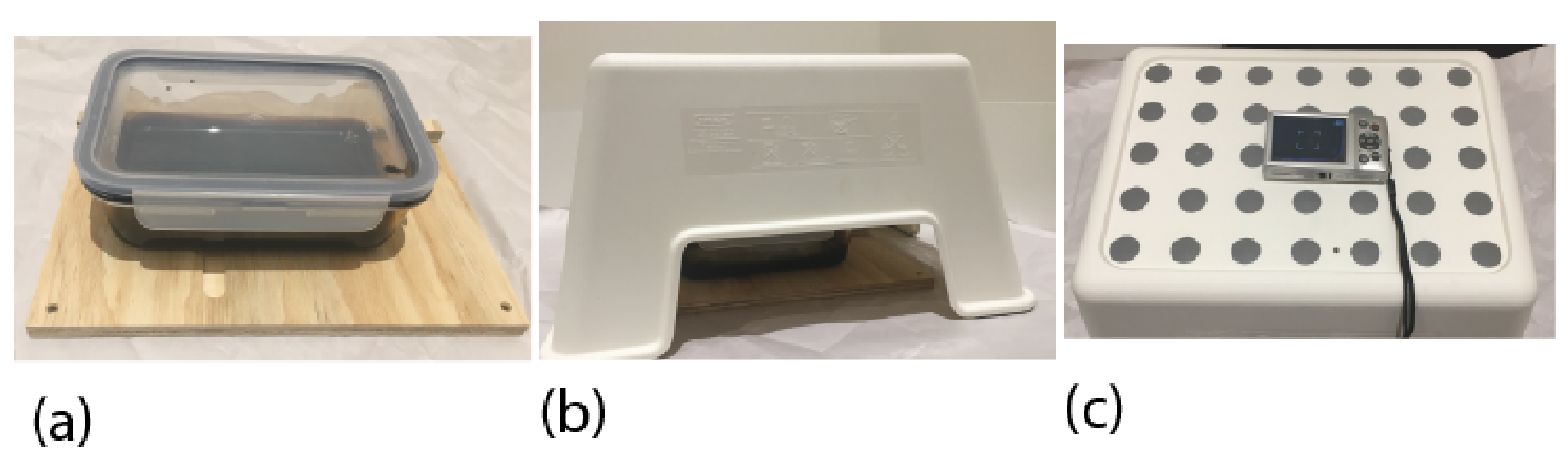
In order to generate plane waves in your ferrofluid, place the container with the ferrofluid on the wooden base, with a long side of the dish along the barrier at the edge of the base. The barrier is to ensure that your dish moves only in one direction when pushed. Ensure that the base is flat and level. To generate pulses, push the dish sharply with your hand a distance of around 2 cm. To ensure consistency in your pulse generation, you can use blu-tack and/or wooden spacers on the wooden base to mark starting and finishing positions for the ferrofluid container. It is recommended that you practice generating pulses at least a few times to be able to generate more consistent pulses.
The stand should then be set up over the dish. The lamp must be used to provide adequate lighting to be able to observe pulses in the fluid. Ensure that you can generate plane wave pulses and observe them by eye through the stand. Once you are able to do this, place the camera on the stand and make a video of a pulse. Note that the lighting and pulse amplitude may need to be adjusted to make a useful video. To adjust the lighting you can use blu-tack to place the light in an appropriate position, and may wish to use the aluminium foil to block or further direct the light.
When adjusting the lighting it is important to consider how to minimise light directly from the source into the camera, and also how to minimise reflections from the lid of the container. Reminder: you must NOT remove the lid from the container for safety reasons. Two options which can be useful in different situations are to have very diffuse light from all directions within the stand, or to direct light onto the fluid through the glass sides of the container.
See the description of the camera in Appendix A for how to make and playback videos. Note that the default automatic settings of the camera are suitable for making the required videos. If you are having difficulty clearly recording the observed effects, you need to adjust the lighting to be able to more clearly observe the wave pulses.
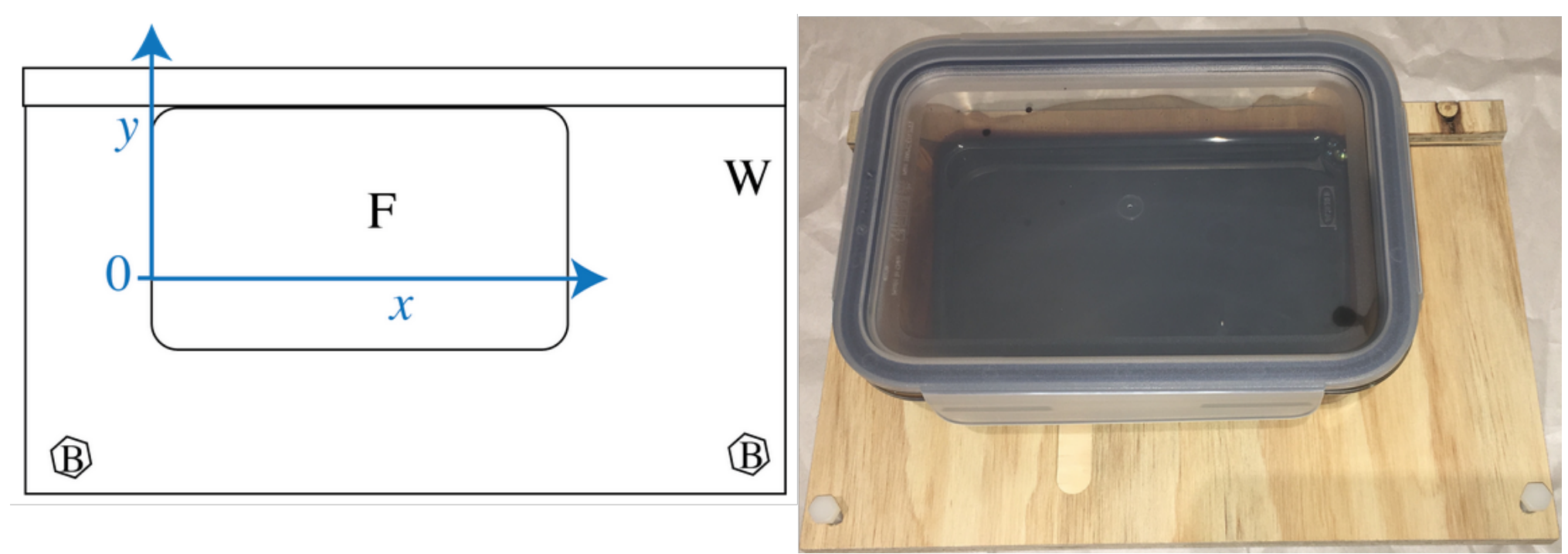
A.1 Draw a diagram of your set up, showing in particular how you positioned and directed the light. [0,3 т.]
A.2 Perform measurements and calculations from a video to find the speed of the waves in the ferrofluid. When performing measurements, also sketch diagrams of key frames of videos, showing important features, and marking any measurements made. [0,8 т.]
A.3 Make an estimate of the uncertainty of your measurement, showing any formulae you use to make the estimate. [0,2 т.]
Part B: Waves pulses in fluid of varying depth (3,4 т.)
Insert the nylon bolts into the holes in the corner of the wooden base. By adjusting the bolts you can set up the platform so that the fluid depth in the container varies linearly with the distance from the lower edge (-direction), and does not vary in the perpendicular direction (-direction). We chose to be where the depth of the fluid , so that the plane is the plane of the fluid's surface.
As the speed of waves in a fluid varies with depth, if a plane pulse is generated at one end of the container it will become curved as it propagates.
Set up your glass dish with ferrofluid on the wooden base so that you will best be able to characterise the variation of pulse speed with depth in the ferrofluid.
B.1 i. Draw a diagram of the container with ferrofluid as you set it up. Mark measurements, with uncertainties, of all distances which are important for you to know depth as a function of in the container.
ii. Write an expression for . [0,3 т.]
B.2 Generate plane wave pulses in your container, and qualitatively sketch a pulse you observe. Mark on your sketch the region where the pulse travels fastest with the letter A, and where it travels slowest with the letter B.
Note: You will need to adjust the position of the light to clearly observe the pulses. To adjust the lighting you can use blu-tack to place the light in an appropriate position, and may wish to use the aluminium foil to make light blockers or light reflectors to further direct the light. [0,3 т.]
To a first approximation, we consider the pulse which is initially travelling in the direction to remain travelling in the direction only. Note: are coordinates of points at time are coordinates of points on the pulse at time .
B.3 i. For a planar pulse which is at when , find a relationship between , and .
ii. Mark on your diagram from B2, with the letter V, where within the glass dish with ferrofluid as you have it set up, this approximation is more valid? [0,3 т.]
B.4 Draw a diagram of your set up, showing in particular the position and direction of the light.
Collect data to find and record in the table in the answer sheet. Include estimates of uncertainty for all data. When performing measurements, also sketch diagrams of key frames of videos, showing important features, and marking any measurements made. [1,2 т.]
B.5 i. Use a graphical method to calculate a value for . Include error bars for each measurement. Provide details of any formulae you use to calculate , its estimated uncertainty , and its estimated uncertainty . Record any additional calculated values for your graphs in the tables for B4.
ii. From your data, state conditions on , and for the relationship you developed in B3 to describe the observed wave pulses. [1,3 т.]
Part C: Wave and magnetic effects (1,8 т.)
Warning: if the magnets collide they are likely to break. Broken magnets are dangerous, and yours will not be replaced if you break it.
As you observed in Question 1, in the presence of a magnetic field, the ferrofluid moves into the region of the strongest field. Your aim in this part is to investigate the interaction of wave a magnetic effects qualitatively.
Set up the ferrofluid container so that the ferrofluid has constant depth, as when you generated plane pulses. Next, place two small magnets underneath, as shown below. The magnets should have their poles aligned so that they repel each other when they are pushed together sideways in the channel on the wooden board. They should be positioned so that, with the ferrofluid in place, they are as close together as possible without repelling.
A safe way to put the magnets in place is to put one in the channel, then place the glass dish with ferrofluid over the track. You can use a wooden spacer in the track to position your magnet. The second magnet can then be slid into position, starting next to the dish, and using the spacer to push it along the channel under the ferrofluid.
Generate wave pulses using the following three methods:
- magnetically by rapidly withdrawing the large N42 magnet from near to the ferrofluid,
- mechanically by sliding the container on the wooden base, and
- mechanically by sliding the wooden base with the container fixed in place on top.
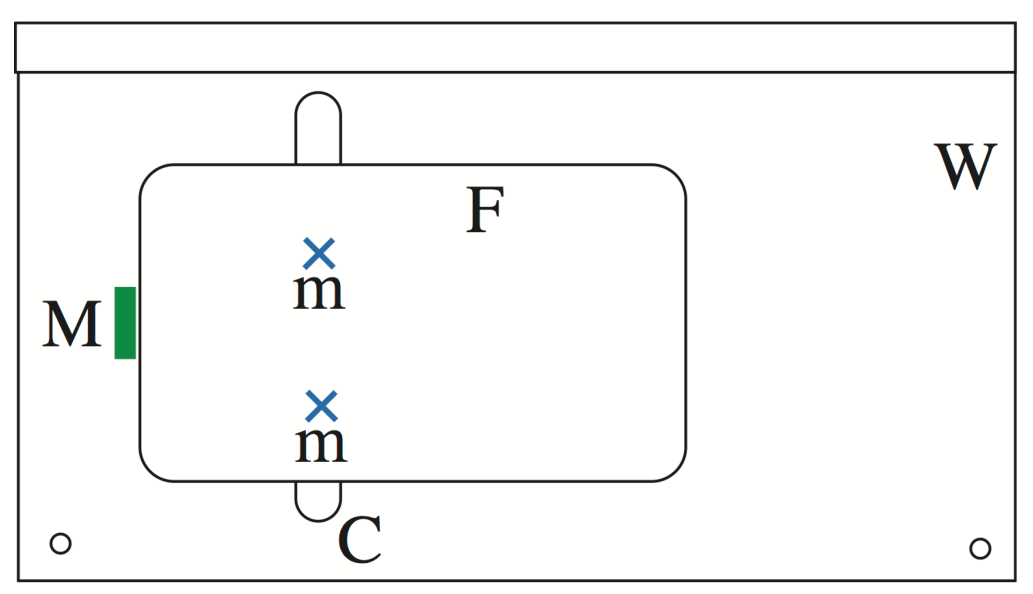
C.1 Sketch qualitative observations of the wave pulses for all three types of driving. Ensure that the diagrams clearly show how the presence of the magnets under the ferrofluid affects the wave front of the pulses. Identify all types of wave phenomena you observe. Mark with the corresponding number which effects cause which features of the observed pulse propagation.
- reflection
- refraction
- doppler effect
- beats
- diffraction
- interference
- (a) standing waves
- (b) from two slits or sources
- (c) from a diffraction grating
- (d) other [1,8 т.]
Part D: Internal properties of ferrofluid within a strong magnetic field (3,5 т.)
In this part your aim is to quantify the effect of a magnet on pulse propagation in a ferrofluid.
Set up the ferrofluid container so that the ferrofluid has constant depth, as when you generated plane pulses.
Generate pulses magnetically using the large N42 magnet, as in C1, and adjust the lighting to clearly observe the magnetically driven pulses.
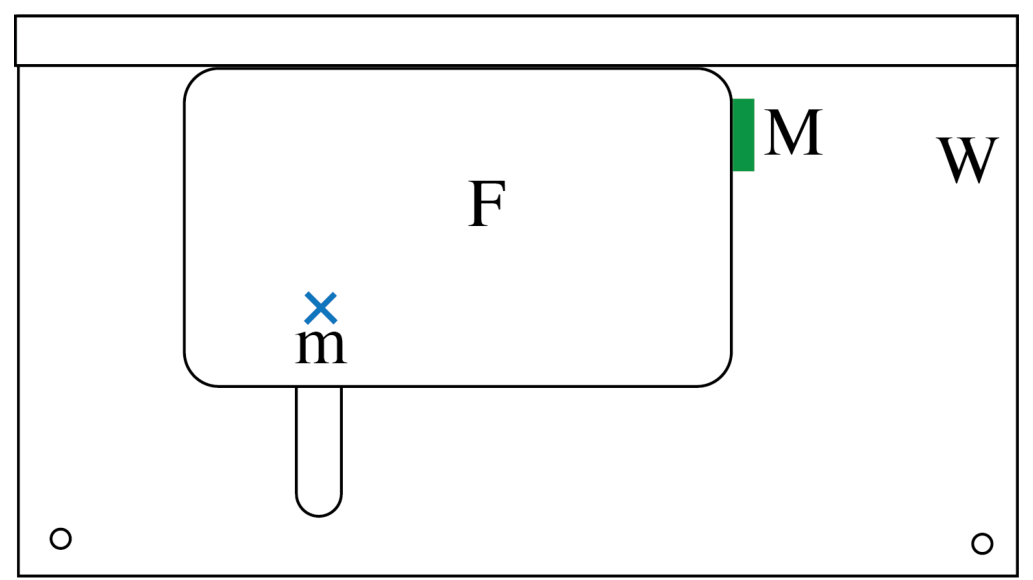
D.1 Qualitative sketch a magnetically driven pulse in the ferrofluid. [0,2 т.]
D.2 Determine the speed of the pulse with its uncertainty. Sketch and diagram of your set up, including light position and direction, and record all data and formulae you use. When performing measurements, also sketch diagrams of key frames of videos, showing important features, and marking any measurements made. [0,8 т.]
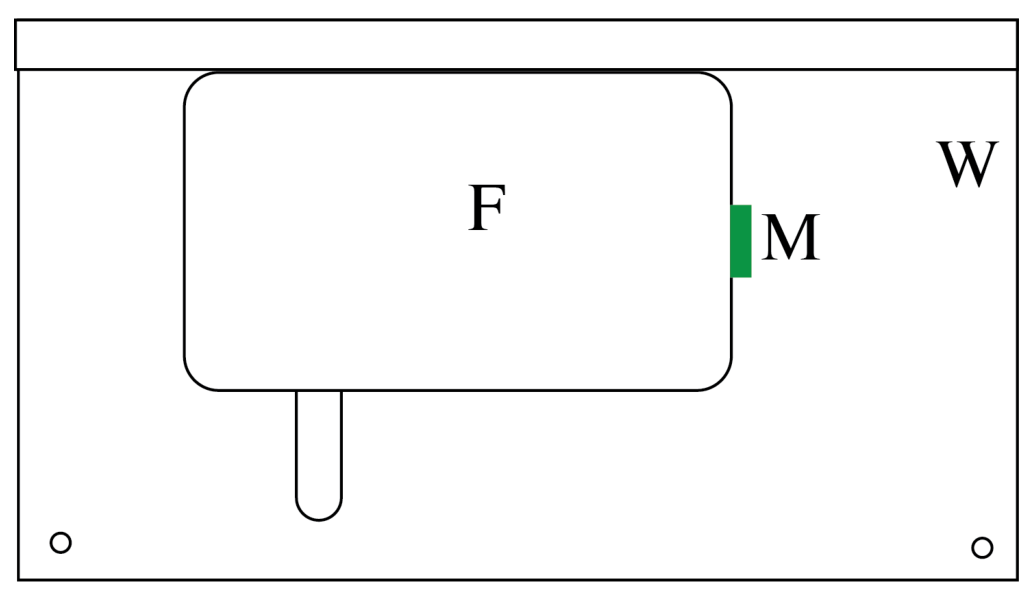
Now place a single small magnet into the channel in the wooden base, and then place the dish and ferrofluid over the magnet. Its position can be adjusted using the wooden spacers, both in the track and to push the magnet around under the glass dish.
Generate wave pulses magnetically, by starting with the large magnet in the position marked in the diagram above, and observe them travelling through the ferrofluid, including the region with the strong magnetic field.
D.3 Sketch qualitative observations of the wave pulses. Ensure that the diagrams clearly show how the presence of the magnet under the fluid affects the wave front. [0,4 т.]
D.4 Draw a diagram of your set up to determine the effect of the presence of the magnet under the fluid on the propagation time for a wave pulse. Clearly mark the positions of the magnets and also the light. [0,3 т.]
D.5 Make and record measurements with uncertainty estimates to determine the travel time of a pulse across the region with the magnet. When performing measurements, also sketch diagrams of key frames of videos, showing important features, and marking any measurements made. [1 т.]
D.6 Does the additional depth of the ferrofluid over the magnet explain the difference in speed of the wave pulses? Show calculations to support your answer. [0,8 т.]
Appendix A: How to use Canon IXUS-185
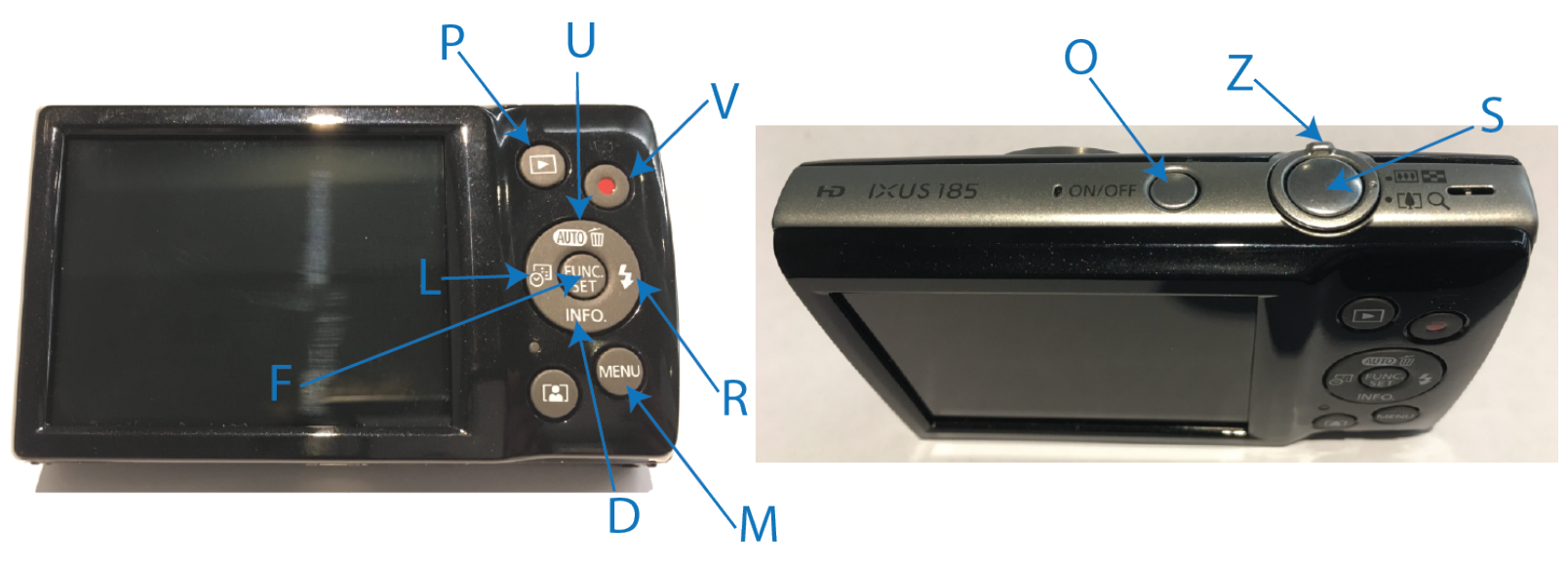
To turn the camera on or off press the button (O) labeled "ON/OFF" at the top of the camera. Note that the camera automatically turns off after a time.
To focus the camera, press the button (S) on the top of the camera part way.
To take a photo press the button (S) on the top of the camera.
To take a video press the button marked with a red dot (V) to start recording. Press it again to stop recording. Note that the default HD videos record at 25 frames per second.
To view photos or videos you have taken, press the review button (P). Use the right (R) and left (L) buttons on the ring button on the back of the camera to navigate through your photos and videos.
- You can zoom in or out of photos using the ring (Z) on the top of the camera. Note: you cannot zoom after taking a video.
- To play a video press the "FUNC. SET" button (F) in the middle of the ring button on the back of the camera twice.
- To pause a video, press the "FUNC. SET" button (F) in the middle of the ring button on the back of the camera while the video is playing.
- When a video is paused you have options on the bottom of the screen. From left to right the options are: Exit, Play, Slow Motion, Skip Backwards, Previous Frame, Next Frame, Skip Forward. Use the right (R) and left (L) buttons on the ring button on the back of the camera to navigate through options, and the "FUNC. SET" button (F) in the middle of the ring button on the back of the camera to change the volume of video playback.
To zoom in or out, push the ring (Z) to the left to zoom out and to the right to zoom in.
To enter the camera settings menu press the button (M) labeled "MENU", then use the right ring button (R) on the back of the camera to enter the camera settings menu. Note that the first option is to mute the camera sounds.
- Use the right (R), left (L), up (U) and down (D) buttons on the ring button on the back of the camera to navigate through the menu.
- Use the "FUNC. SET" button (F) in the middle of the ring button on the back of the camera to select options.
- Use the "MENU" button (M) to exit the menu or to move back up through the menus.
To change the language of the camera, first enter the camera settings menu (see above). Press the down right button (D), labelled "INFO." on the back of the camera to scroll down the many page list to find "Language". Next press the right ring button (R) on the back of the camera to enter the list of language options. The the right (R), left (L), up (U) and down (D) buttons on the ring button on the back of the camera to navigate to the language of your choice. Use the "FUNC. SET" button (F) in the middle of the ring button on the back of the camera to select the language.
Note: You are not expected to change any settings on the camera, except for optionally changing the language, as the default automatic settings are suitable for the videos are you are required to make. You will benefit more from adjusting the lighting of your set up.
Отговори
Part A: Plane pulses, A.2 0.26 m/s
Official value m/s for the fluid used in Adelaide in May 2019; the solutions state that quantitative values depend strongly on the fluid depth and properties.
Part B: Waves pulses in fluid of varying depth, B.5 5.9 m^(1/2) s⁻¹
Official value (the solutions call the constant , the statement ); values depend on the fluid used.
Решение
These quantitative values obtained depend strongly on the depth and other properties of the fluid, including how much oil has evaporated. The values mentioned in here correspond to the fluid as used at the APhO in Adelaide in May 2019.
Qualitative aspects of the solutions apply, even where values vary.
Throughout the light is used in two modes when taking videos. For parts A and D, the light is set up so that it is illuminating the ferrofluid surface through the sides of the box.
This direct lighting is used in Part A and Part F.
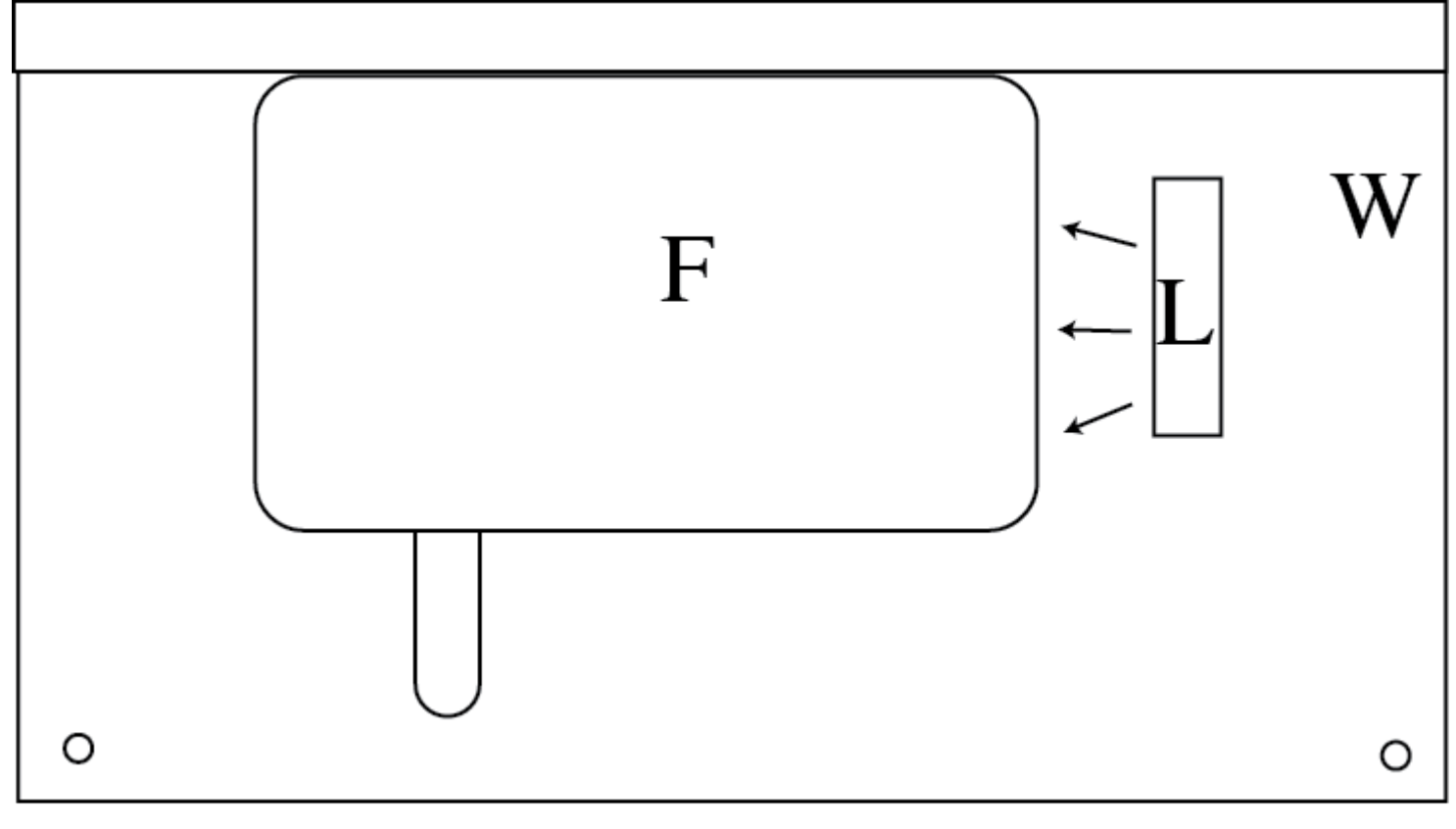
F – box with fluid
L – light
W – wooden base
Diffuse lighting is used for other parts. In this case the light is direction up and away from the box with ferrofluid.
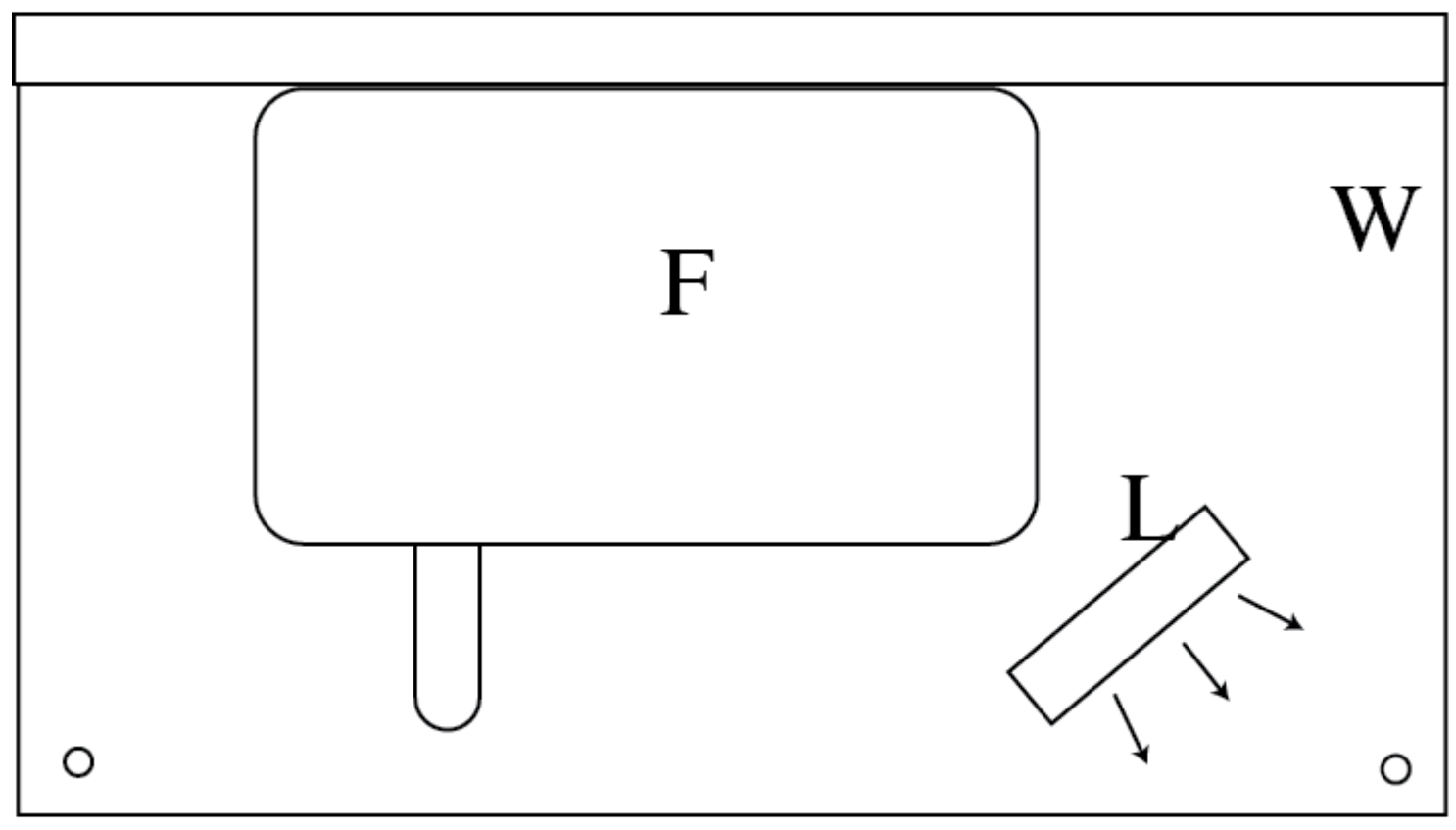
Part A Plane pulses
A.1 Direct lighting was used, so see above for diagram.
A.2 Some example frames from videos are shown below.
Note that the scale on the graticule does not directly measure position.
A measurement with a ruler of the internal length of the container is cm.
The distance is equivalent to 13.4 graticule squares, so there is a factor of 17.0/13.4 to convert from graticule squares to cm.
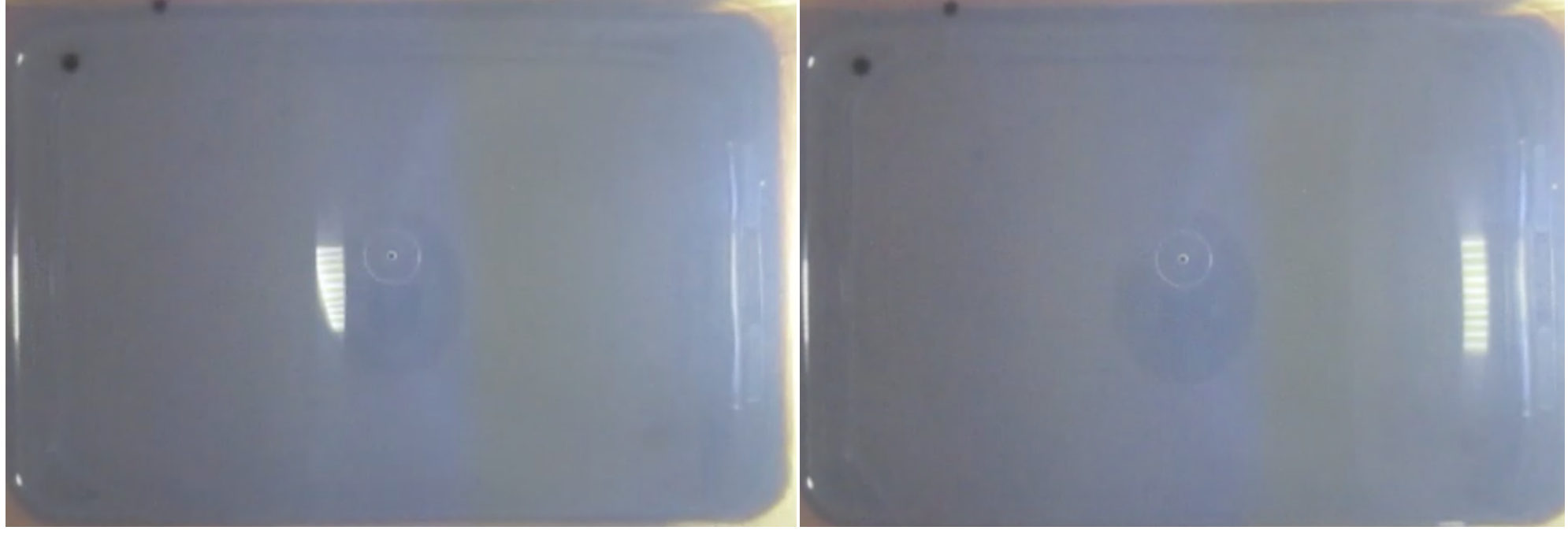
The images above show two frames from a video of a plane pulse. The videos are recorded at 25 fps by default
| Frames | Distance (graticule squares) | Distance (m) | Speed (m/s) |
|---|---|---|---|
| 8 | 6.5 | 0.83 | 0.26 |
| 7 | 6.0 | 0.76 | 0.27 |
| 9 | 6.8 | 0.85 | 0.24 |
This gives
A.3 The uncertainty is estimated from the spread of values.
Part B Wave pulses in fluid of varying depth
B.1
i.
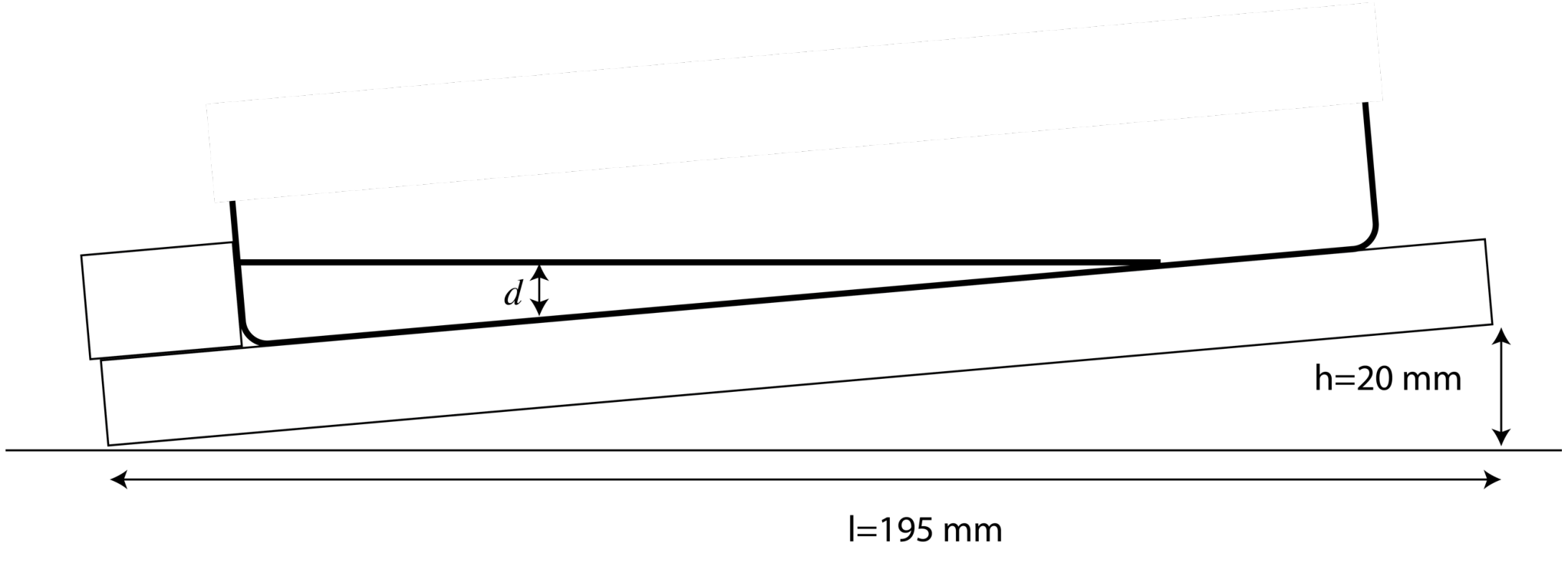
, . The latter uncertainty is larger due to difficulty lining up ruler with projection of end of the board.
ii.
Since the depth varies linearly, .
Here , so .
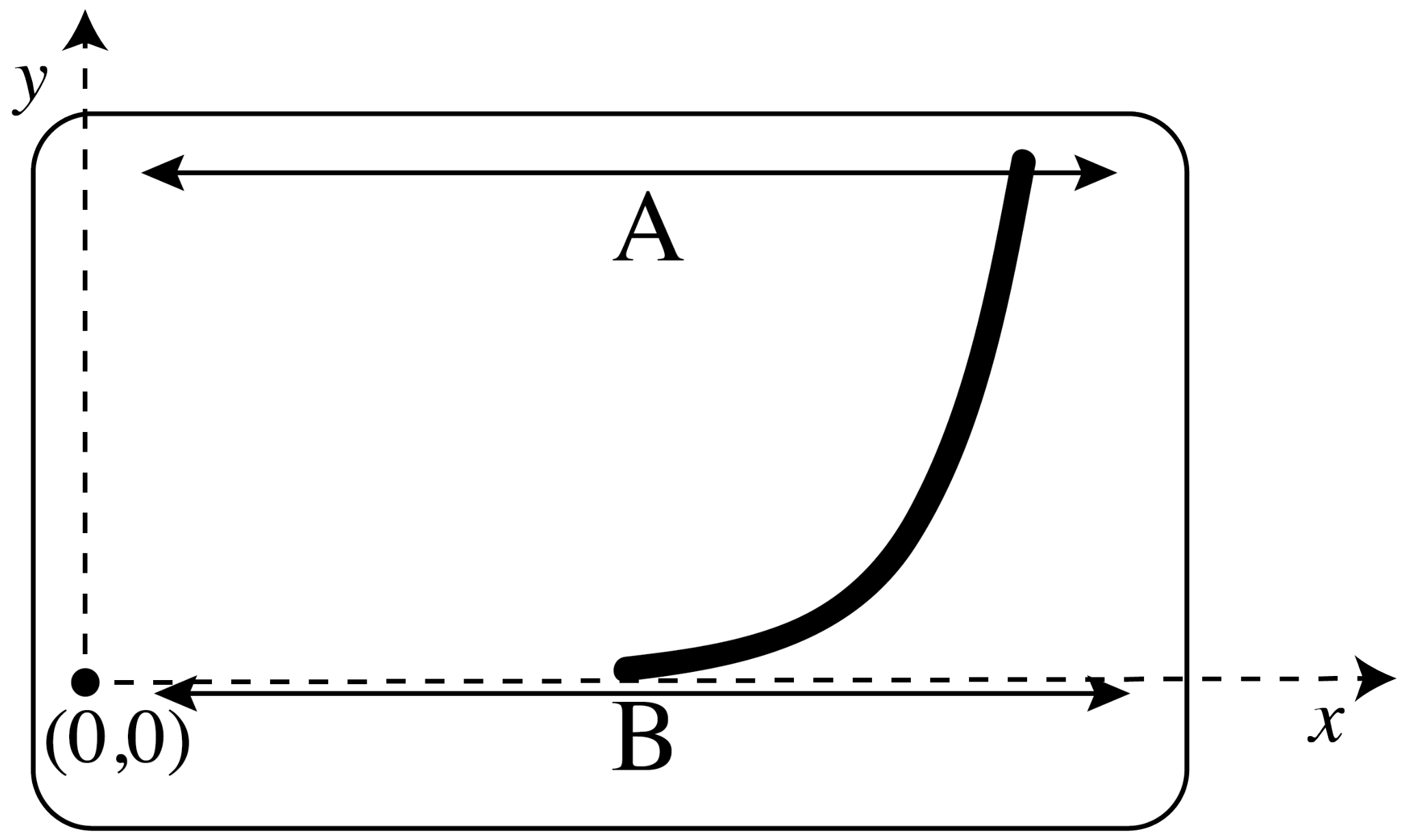
B.2
A – fastest at largest y.
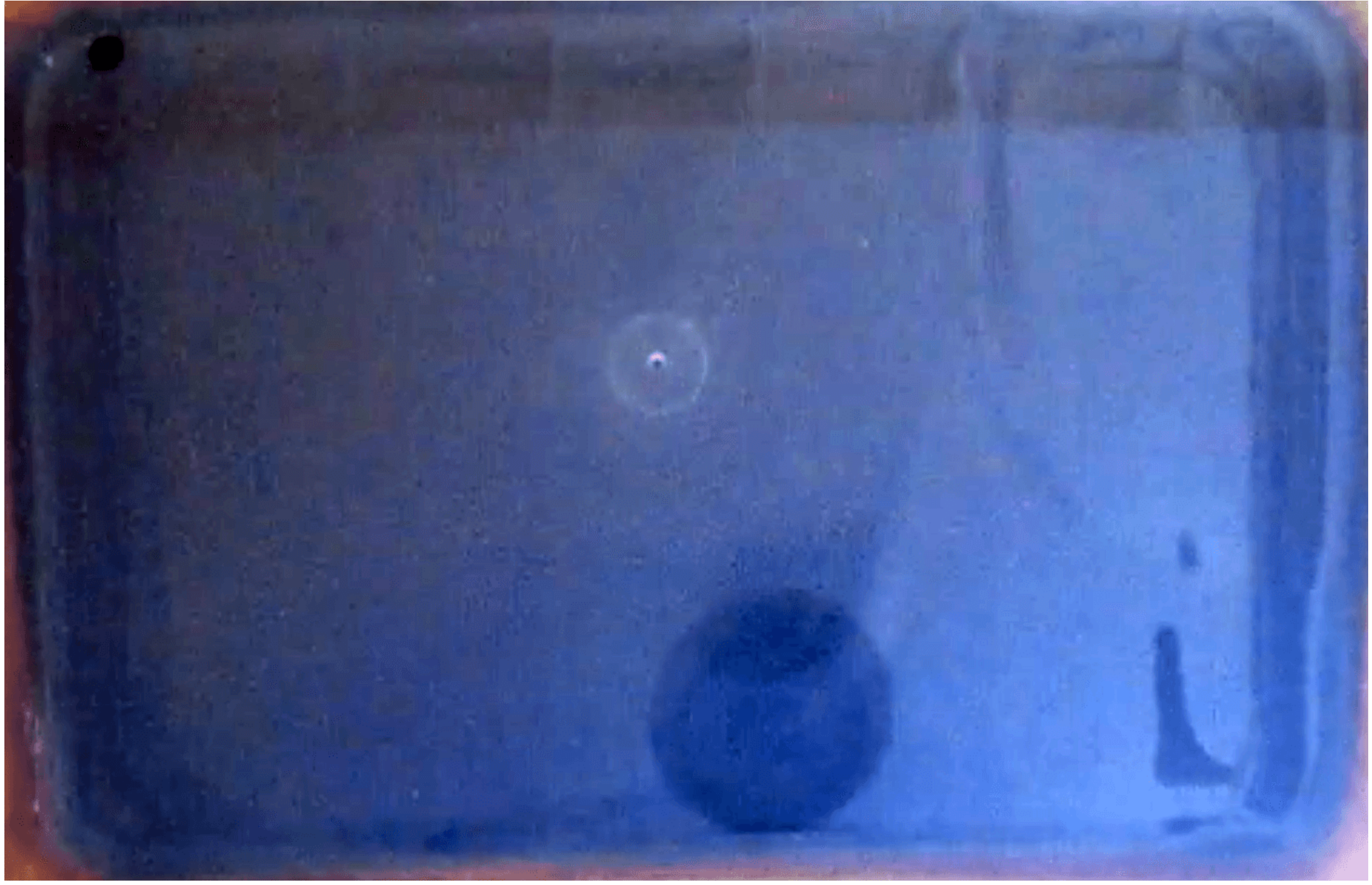
B – slowest at y=0.
B.3 If x=0 when t=0, then , however, , so .
Hence, , or equivalently, .
Here , so .
This approximation will be least valid when the direction of propagation varies the most from the x-direction, and when the depth is least as there are nonlinear effects. Both of these happen for small y, in other words, for some constant . This is shown as the grey shaded region marked V on the diagram below.
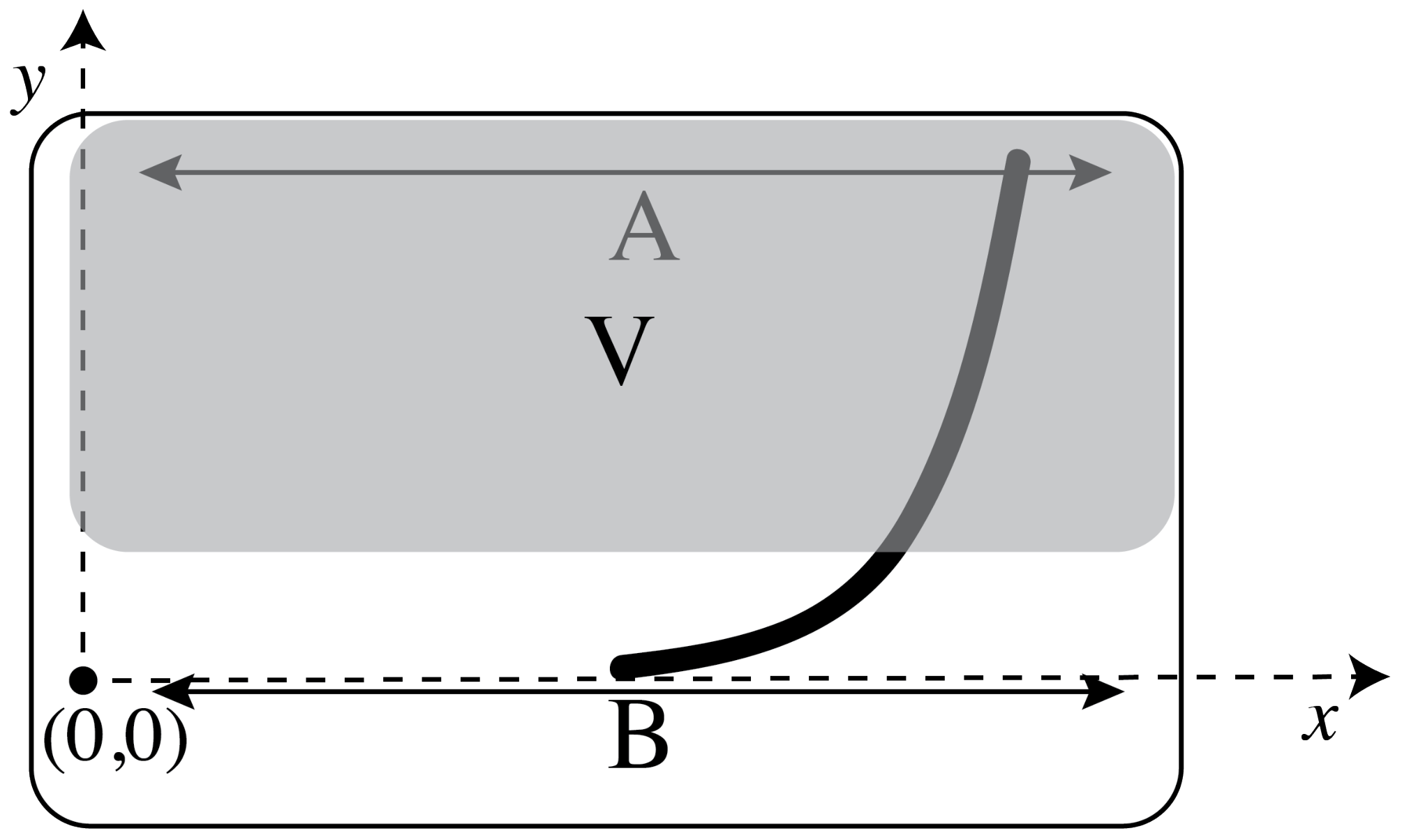
B.4 Diffuse light is more appropriate as the pulses are curved, so it is not possible to get direct reflections from the available source from enough of the pulse. See the second diagram on p. 1 for light position.
Videos of the curved pulses are recorded, with adjustments to the lighting, until a clearly visible pulse is observed near where the fastest travelling sections have reached the end. For that single frame the coordinates of points along the pulse are recorded.
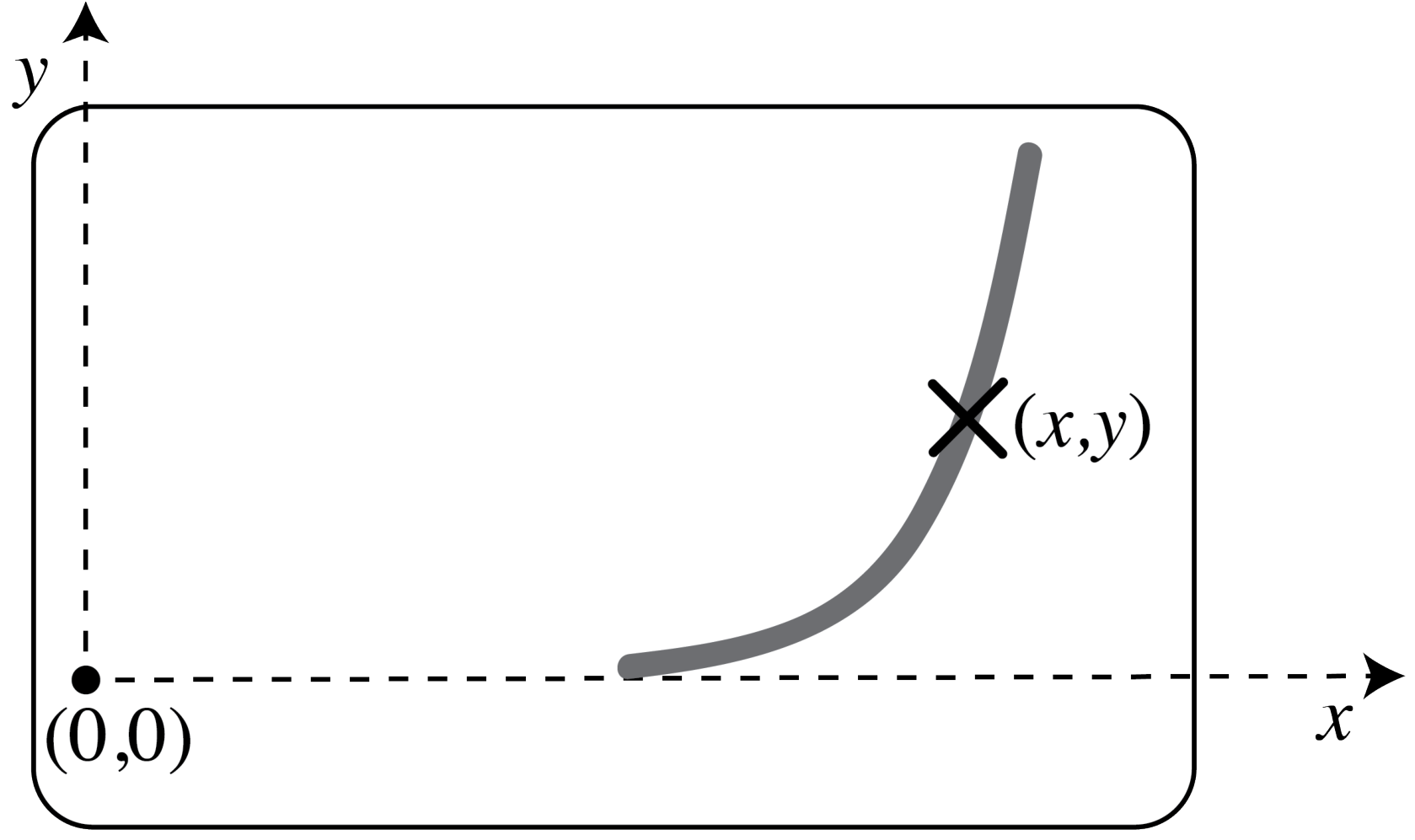
The 8th frame after the generation of the pulse was used so .
Here is the x coordinate of the position where the pulse front is at y=0. This is treated as the new origin, and the offset in the position is gr sq.
| (gr sq) | (gr sq) | (gr sq) | |
|---|---|---|---|
| 5.0 | 0.2 | 0.25 | 0.02 |
| 6.0 | 0.3 | 2.25 | 0.15 |
| 7.0 | 0.6 | 6.3 | 0.4 |
| 7.8 | 1.4 | 10.9 | 0.6 |
| 8.5 | 2.2 | 16.0 | 0.8 |
| 8.7 | 2.8 | 17.6 | 0.8 |
| 9.0 | 4.0 | 20.3 | 0.9 |
| 9.3 | 5.0 | 23.0 | 1.0 |
| 9.8 | 6.0 | 28.1 | 1.1 |
| 10.0 | 8.0 | 30.3 | 1.2 |
| 9.9 | 7.0 | 29.2 | 1.2 |
B.5
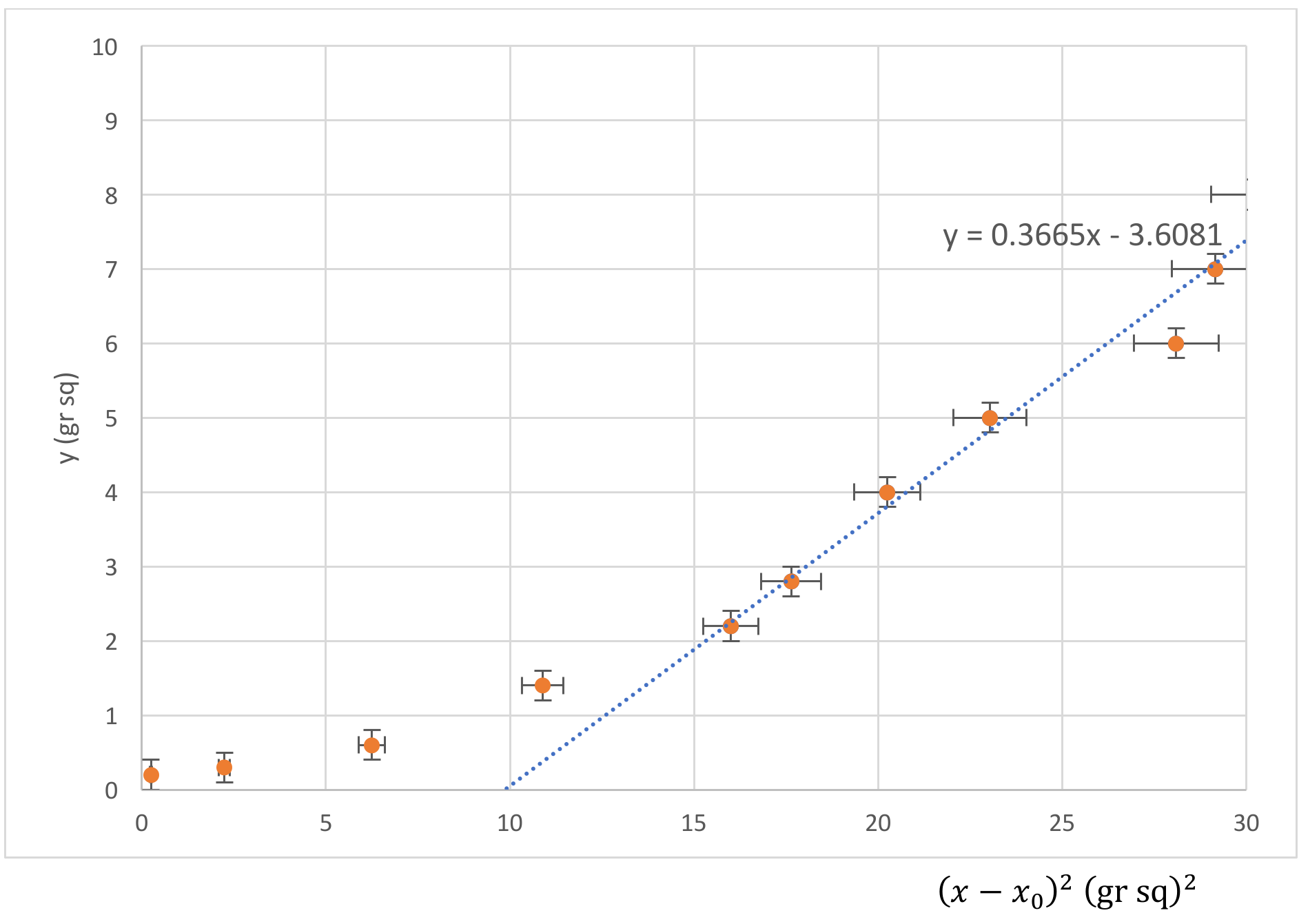
Converting to SI units, the slope m = 0.280 /m.
Hence , and .
Uncertainty was calculated from the slope of the line of worst fit m = 0.331/m.
Part C Wave and magnetic effects
Mechanically driven by pushing glass
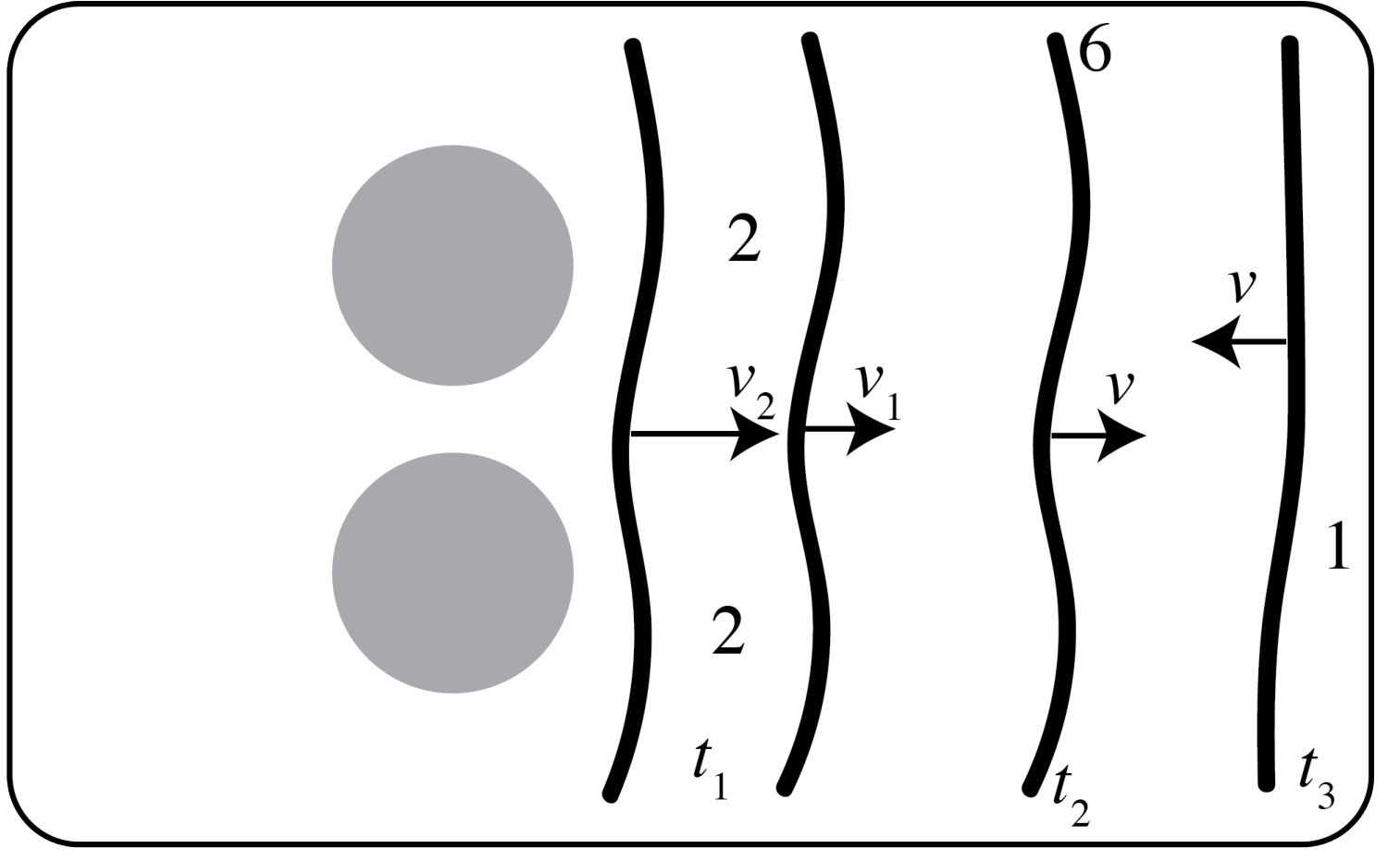
Refraction observed by perturbation of front over magnets,
Interference when the fronts meet,
Reflections from end.
Mechanically driven by pushing base
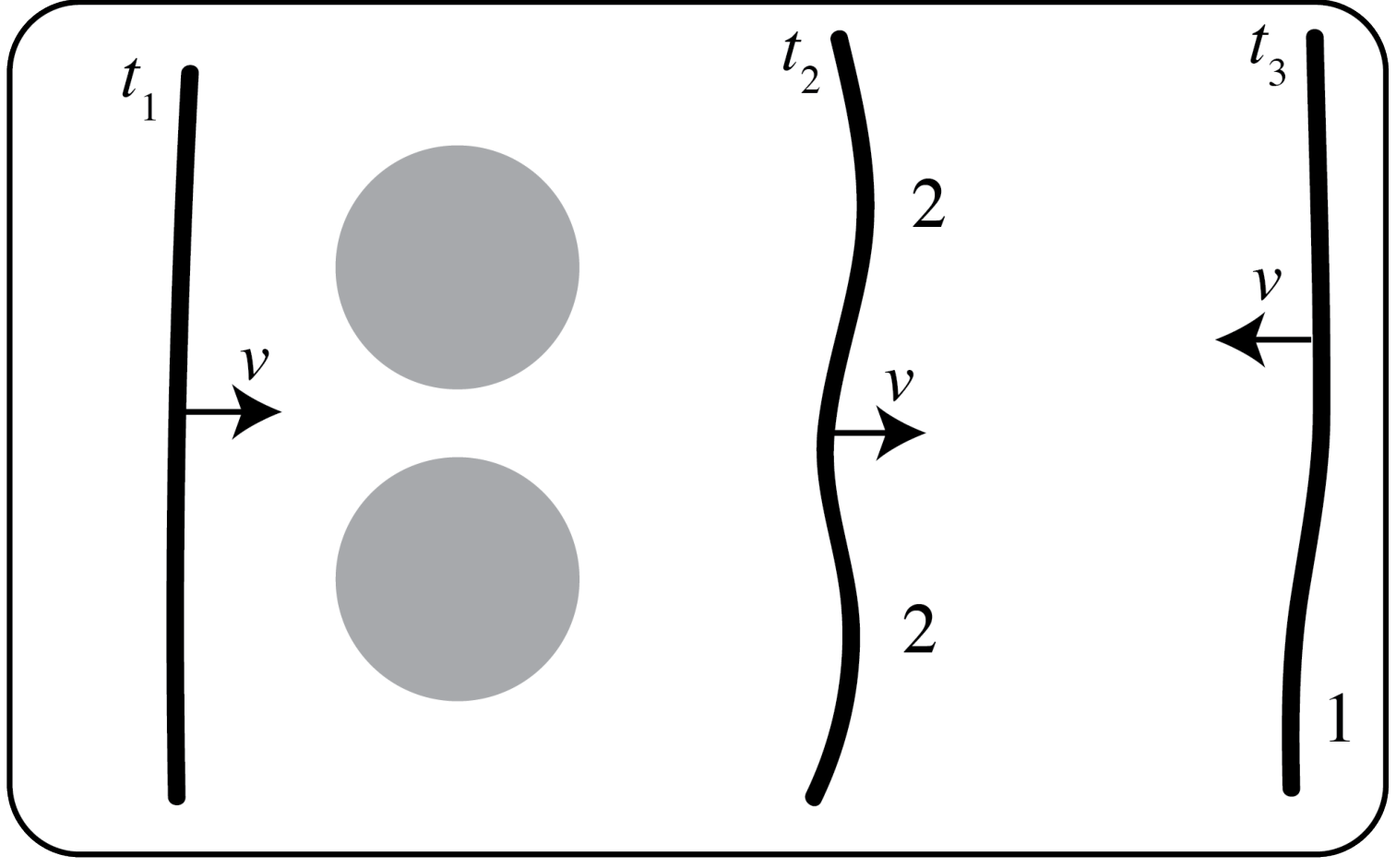
Refraction as wave is perturbed over the fronts,
Reflections from ends,
Maybe some diffraction after passing between the lumps over the magnets.
Magnetically driven
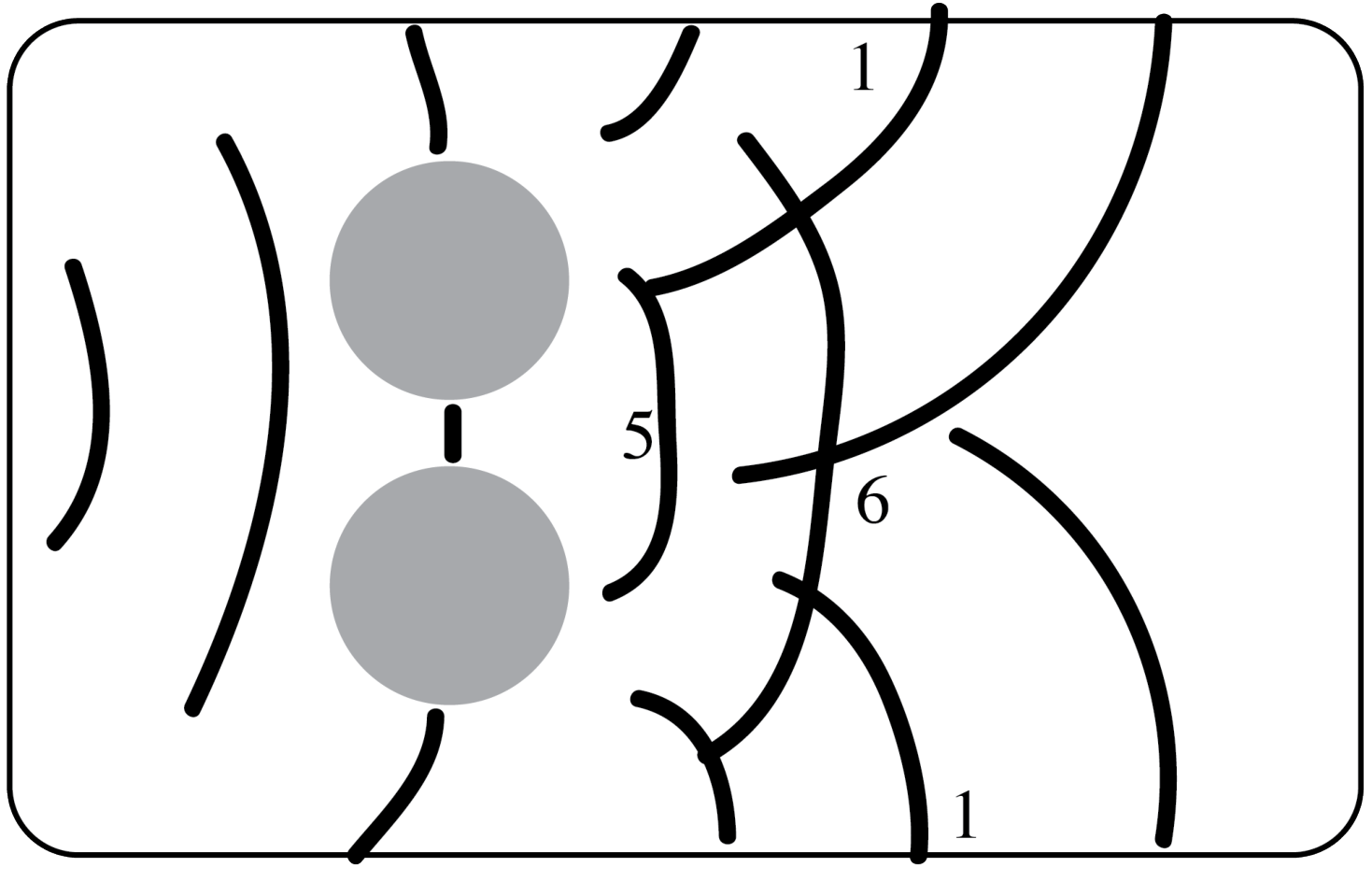
Reflections from side walls and ends
Diffraction after passing between the lumps.
Interference from many waves crossing.
Each line represents the position of a pulse front in a particular frame.
Part D Internal properties of ferrofluid within a strong magnetic field
D.1
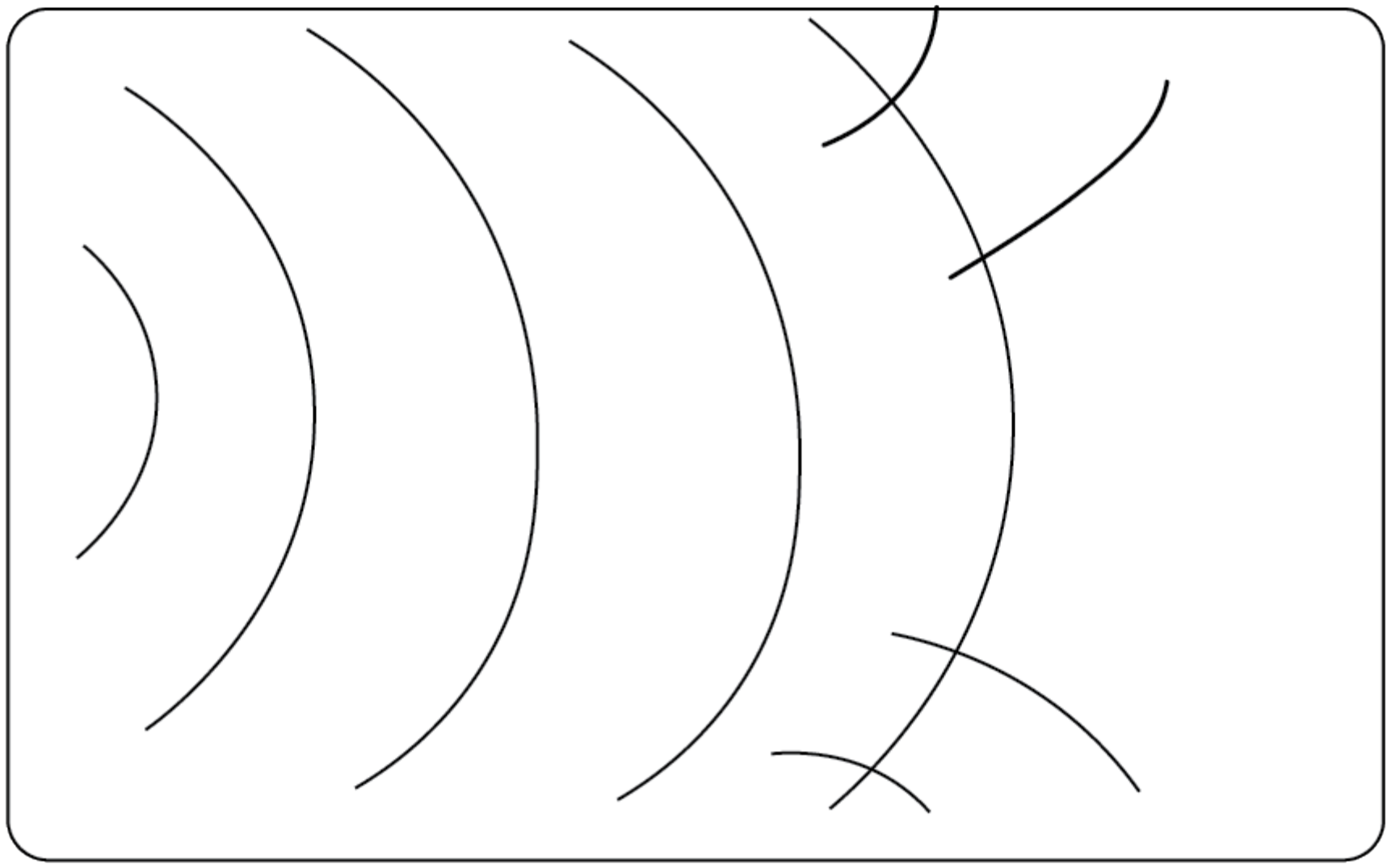
Magnetically driven pulses are not planar, so there is resulting reflection from the sides of the container. Note the multiple lines demonstrate the same pulse at different times.
D.2 Direct lighting, as in the first diagram on p. 1.
Speed measurements of the magnetically driven waves are around the same, to somewhat faster than small amplitude mechanically driven waves. Students should find that pulses are around 0.1-0.4 (gr sq)/m faster than in A2/3.
Data and sketches should look similar to A2/3 otherwise.
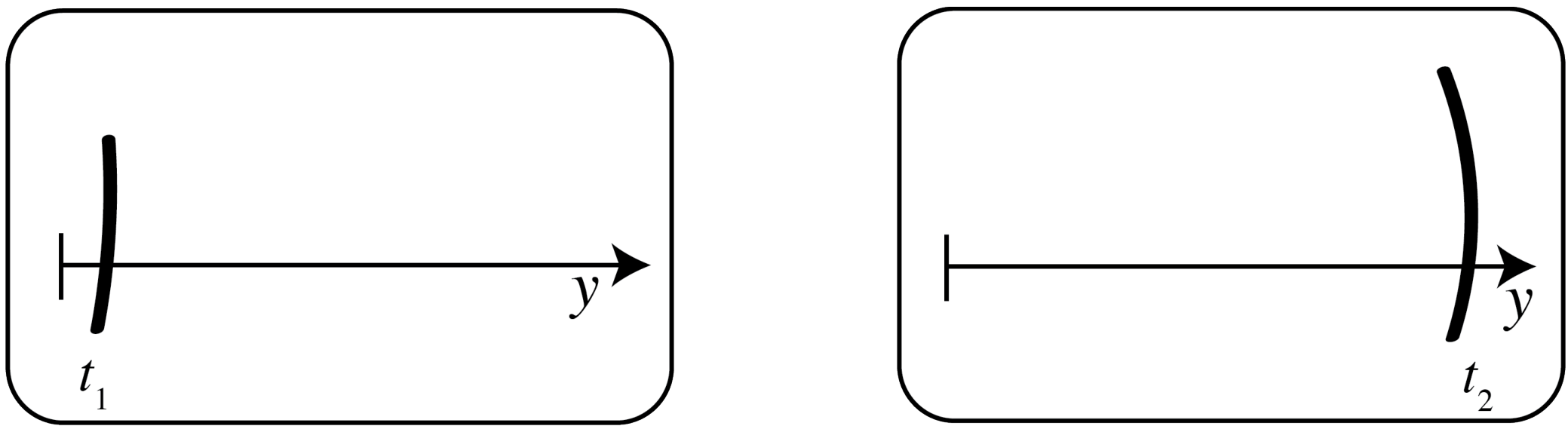
Measurements of the y position at two times, and the difference in the times allow calculation of the speed.
The height of the lump can be estimated by observing from the side, or more accurately by using the limiting value from E1 Part C.
D.3 The light was placed in the diffuse light set up. See the second figure on p.1.
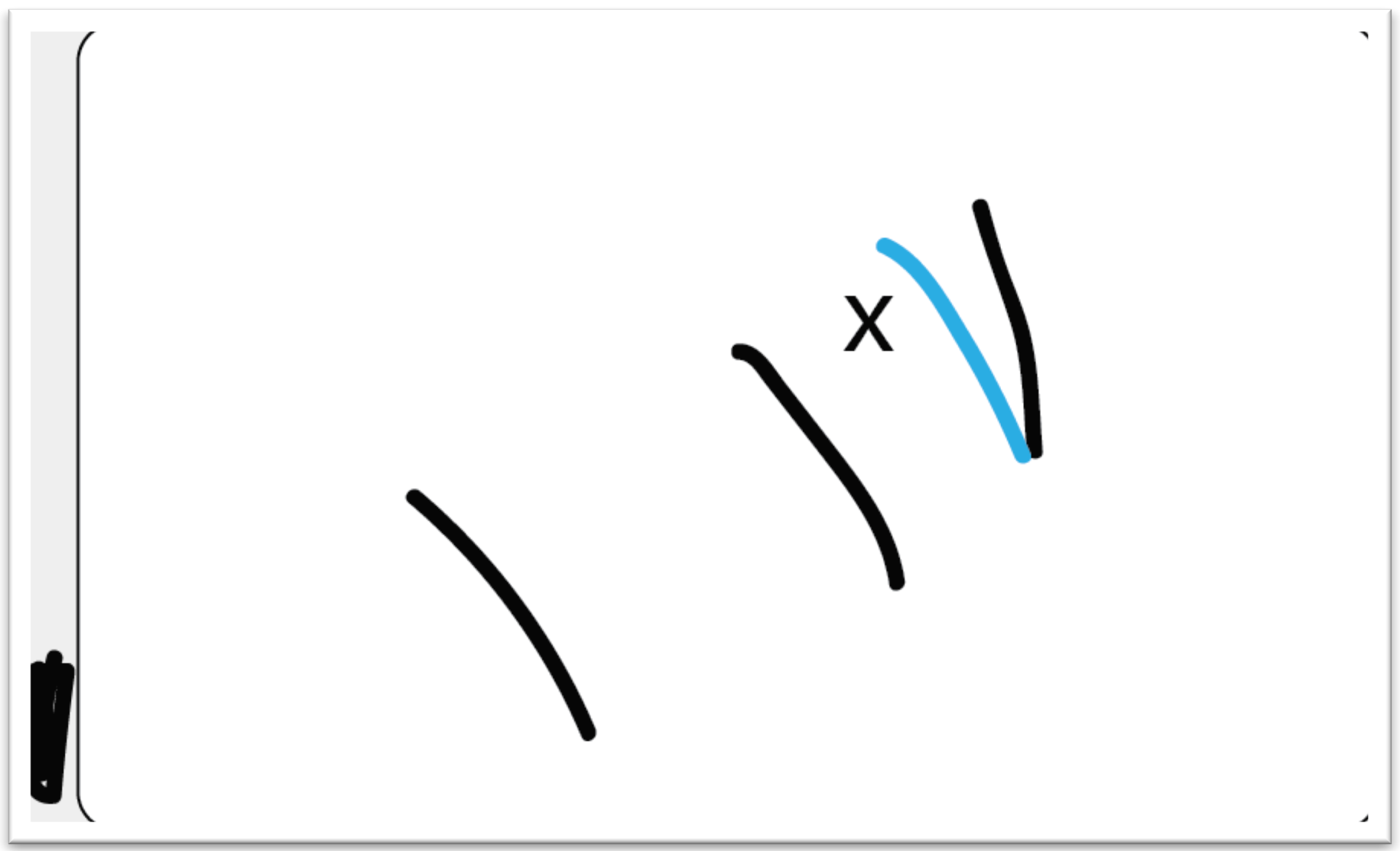
The black represents observed pulses over the magnet x. The blue represents the expected positioning of the pulse after travelled that distance.
D.4 The diffuse lighting set up was used again.
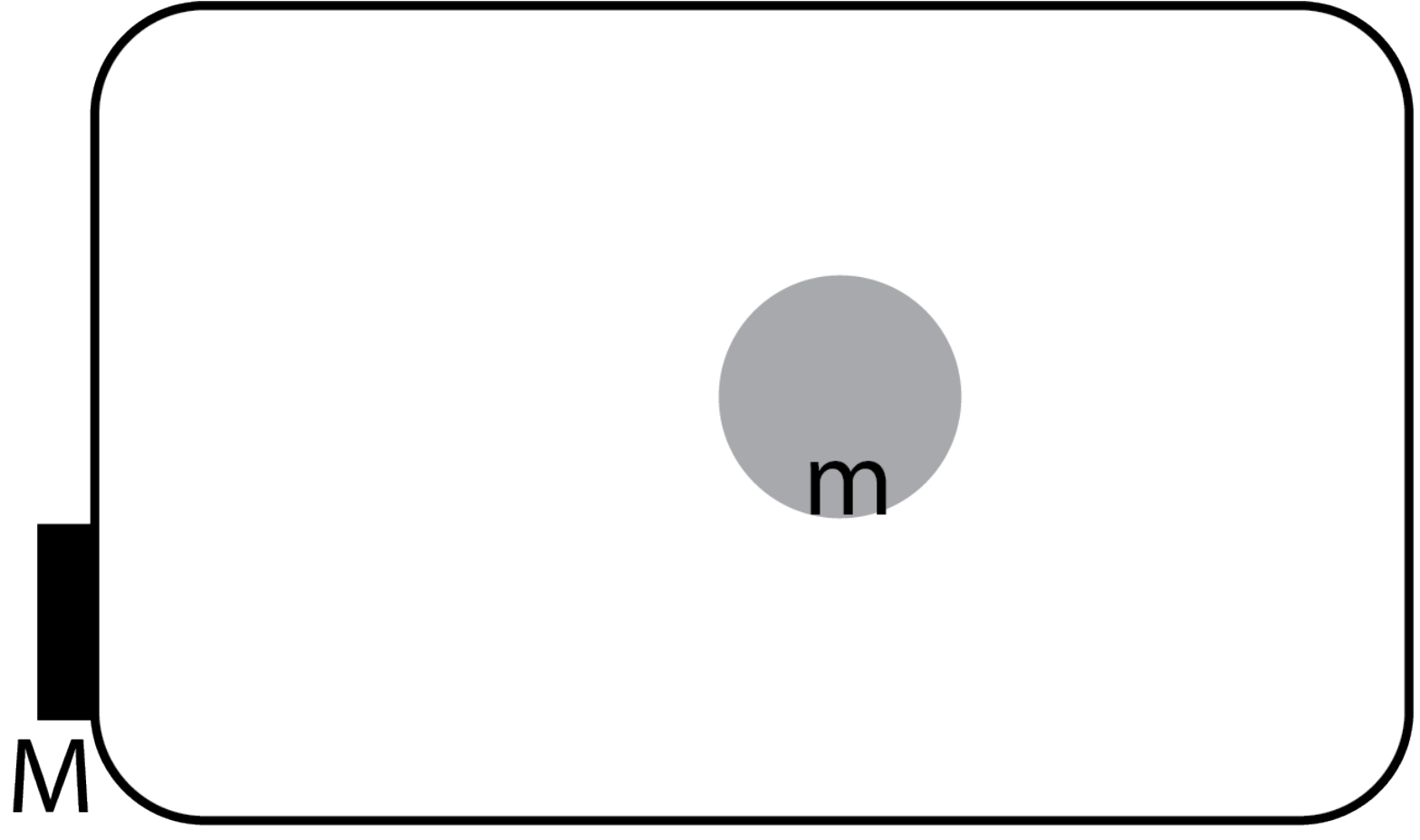
D.5
A wave front was observed to travel as additional 0.8 gr sq over 8 frames. The extent of the lump is assumed to be 3cm in diameter and the additional distance in the time all occurs over the lump. The wave crossed the lump in around 2 frames This means that the wave travels at a speed of around 0.35 m/s over the lump.
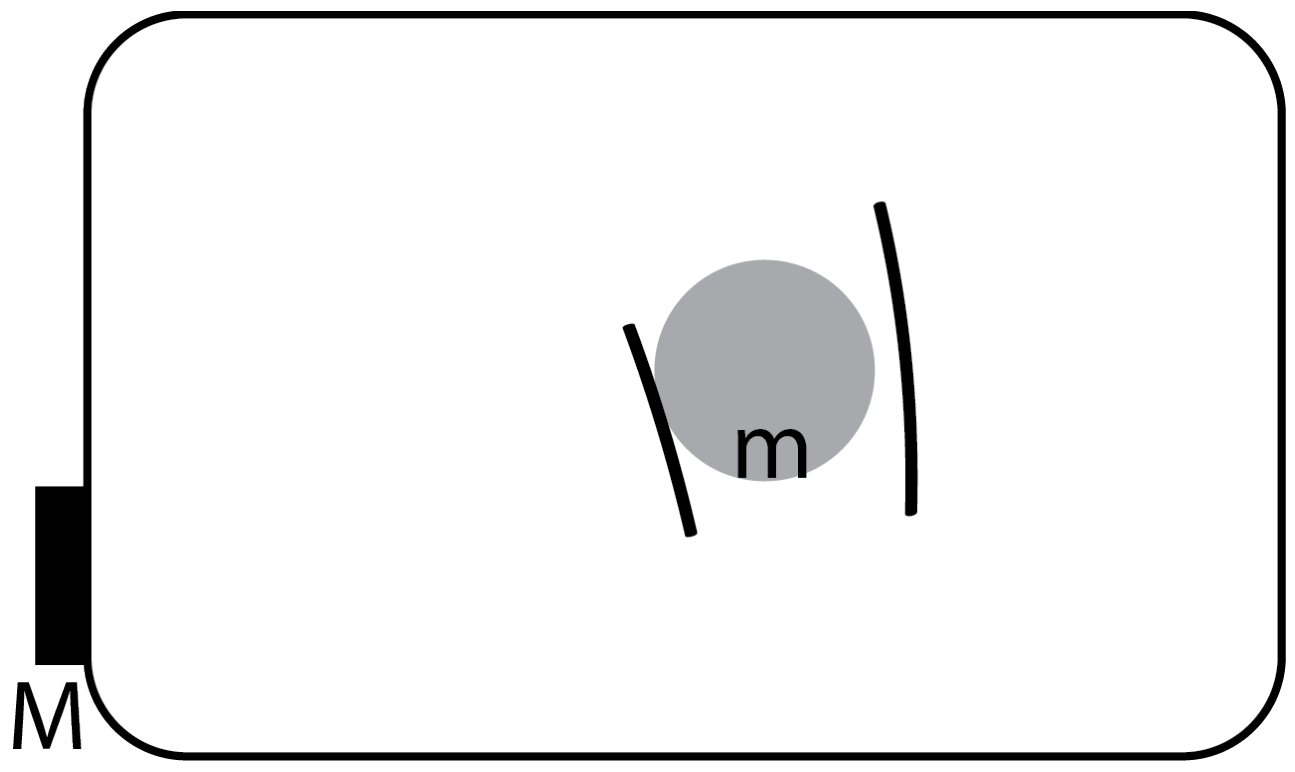
The two wavefronts shown above are only 2 frames apart.
Measurements of position were taken when the wavefronts where further apart.
D.6 The height of the lump can be estimated by observing from the side, or more accurately by using the limiting value from E1 Part C.
The best estimate of the height of the lump is found to be 5mm. The expected speed of fluid of depth 9mm, compared to fluid of depth 4mm is times larger, which is .
As these are estimates they are close enough that we cannot conclude that the change in wave speed is due to anything other than the additional depth of the fluid.
Оригинал в Архива: exp2.pdf · официални решения: exp2_sol.pdf