APhO 2022, Експеримент — Задача 2. Acoustic blackbox
Experiment Q2 — Acoustic blackbox · 10 т.
Условие
A sound source is moving on a circle of fixed radius in x-y plane with a constant angular speed . The circle is also moving with a uniform velocity which makes an angle () with the -axis. Figure 1 shows the trajectory of the source in red color dash-dotted line. At time , the center of the circle is at C, with coordinates , the position of the source is given by vector from C. In addition, the source S starts moving anticlockwise (counterclockwise) direction (see Fig. 1) simultaneously emitting a sound of frequency at time . Vector makes an angle with respect to the -axis at ( in Fig. 1(a)). A detector D is kept in the same plane (-) such that its distance from the origin and the angle which the position vector makes with the -axis are and respectively (in Fig. 1(b)). Line joining the detector D and the source S makes an angle with the -axis. All the motions of the source and the detector are in the - plane only. The speed of sound, is 330m/s. Also, the net speed of the source is smaller than .
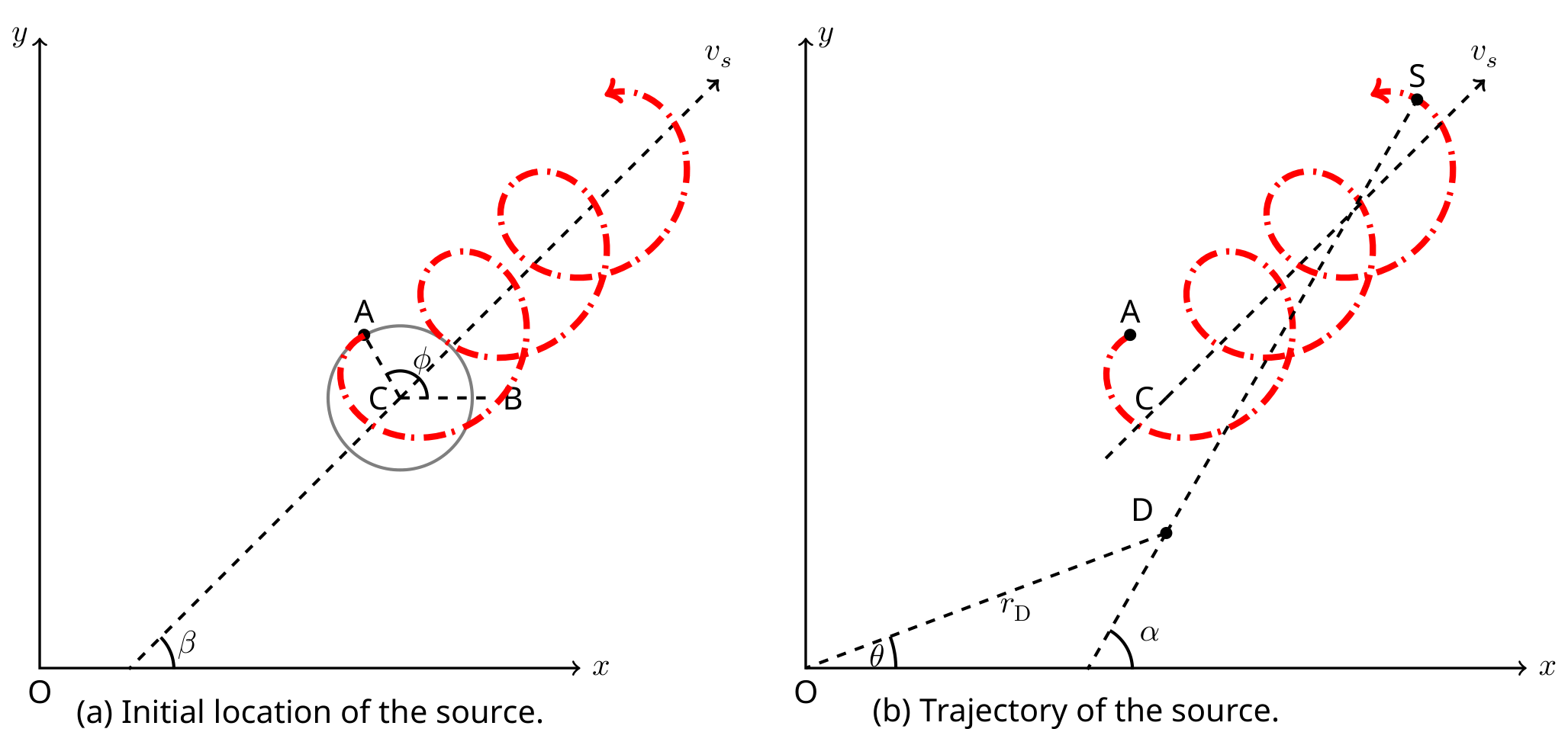
The sound emitted by the source is detected by the detector at time with frequency . The simulation displays the detected frequency .
¹ Siddharth Tiwary (IIT Powai, Mumbai), Siddhant Mukherjee (The University of Cambridge, UK), Chandan Relekar (IISc, Bangalore), Charudutt Kadolkar (IIT Guwahati), Praveen Pathak (HBCSE-TIFR, Mumbai), were the principal authors of this problem. The contributions of the Academic Committee and the International Board are gratefully acknowledged.
A.1 Obtain the equation of the trajectory () of the source in terms of , and the other relevant quantities. [0,2 т.]
Click on "EQ2- Acoustic Black box" on the exam portal for the experimental exam.
About simulation:
There are two parts to the simulation. The upper part of the panel is the input panel for the detector's parameters and the lower part of the panel is the display of the graphical output of the frequency () detected by the detector at time .
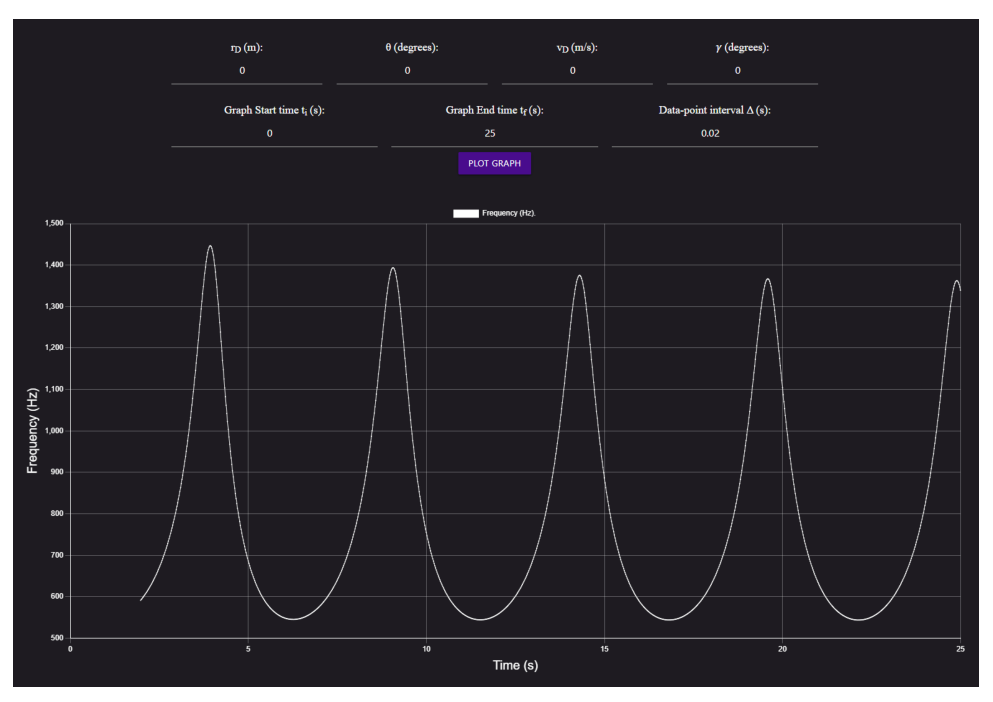
(Figure 2)
You can change the detector's position by entering the values of and in the input panel. If you change the value in the panel, you need to click the "PLOT GRAPH" to view the changed output of . You can change the interval at which data is collected in the field “Data-point interval Δ”. Note that this interval can only be a multiple of 0.001s.
You can set the detector in uniform motion by entering the speed and the angle , which velocity vector makes with the -axis. Again you have to click the "PLOT GRAPH" button to view the output for the changed parameters.
Once the PLOT GRAPH button is clicked, a graph will be displayed for the interval "Graph Start time ()" to "Graph End time ()". In Fig. (2), the panel displays the graph for 0 to 25 s.
(Figure 3)
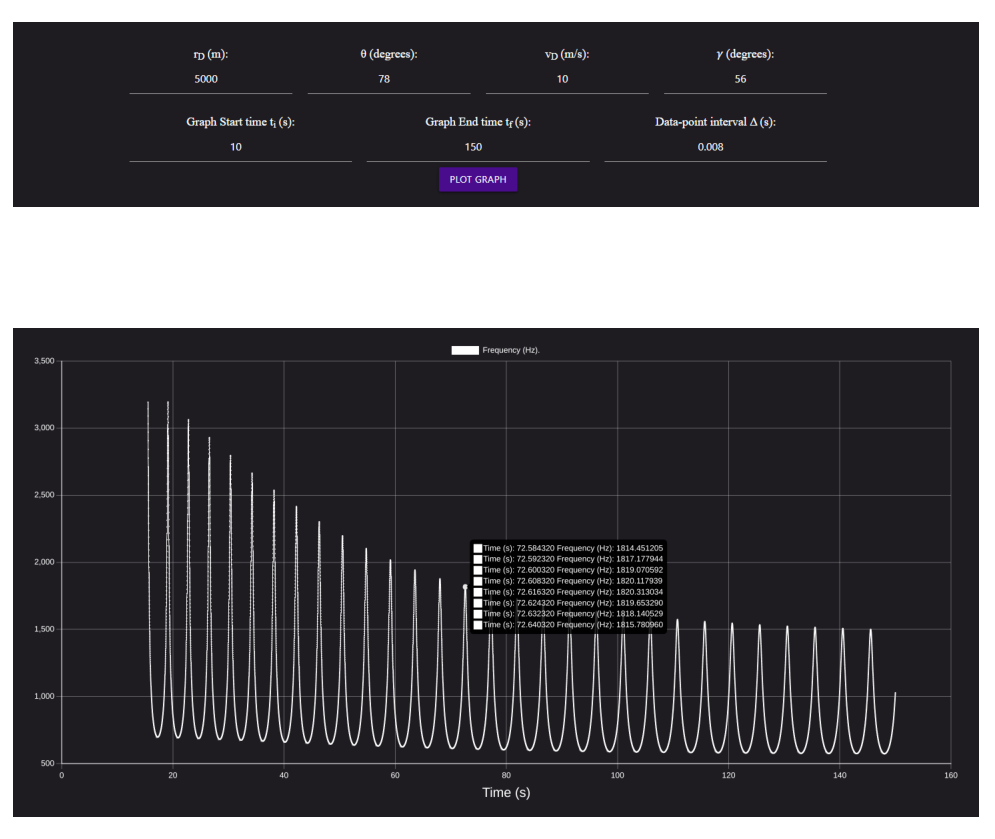
Graph Start and End time input can also be used to zoom in on a portion of the graph. To illustrate, Fig. (3) shows the output for the case when the detector is placed at 5000 m at angle . The graph output is plotted between 10-150 s. Data is collected at every 0.008 s. When you place the cursor over the curve's data point, it shows the values of the data points. Since the time interval is very small, placing the cursor over the curve may show the values of multiple data points. In Fig. (3), eight data points are shown. Caution: If you keep the data point interval (Δ) very small (say 0.001) and plot it for a long time interval (say Graph Start time() to Graph End time()), simulation will take a long time and may freeze depending on the capacity of your machine. If you are stuck in such a situation, follow the steps given in the General Instructions. Very small Δ can be used only for a small time interval of the plot. While running simulation maximum number of data points that simulator can plot is 25000, irrespective of Graph End time ( (s)).
Try various values of the detector parameters in the simulation and carefully observe the output. Use the output of the graph for the calculation in the following parts. You may use graph papers in any part if required.
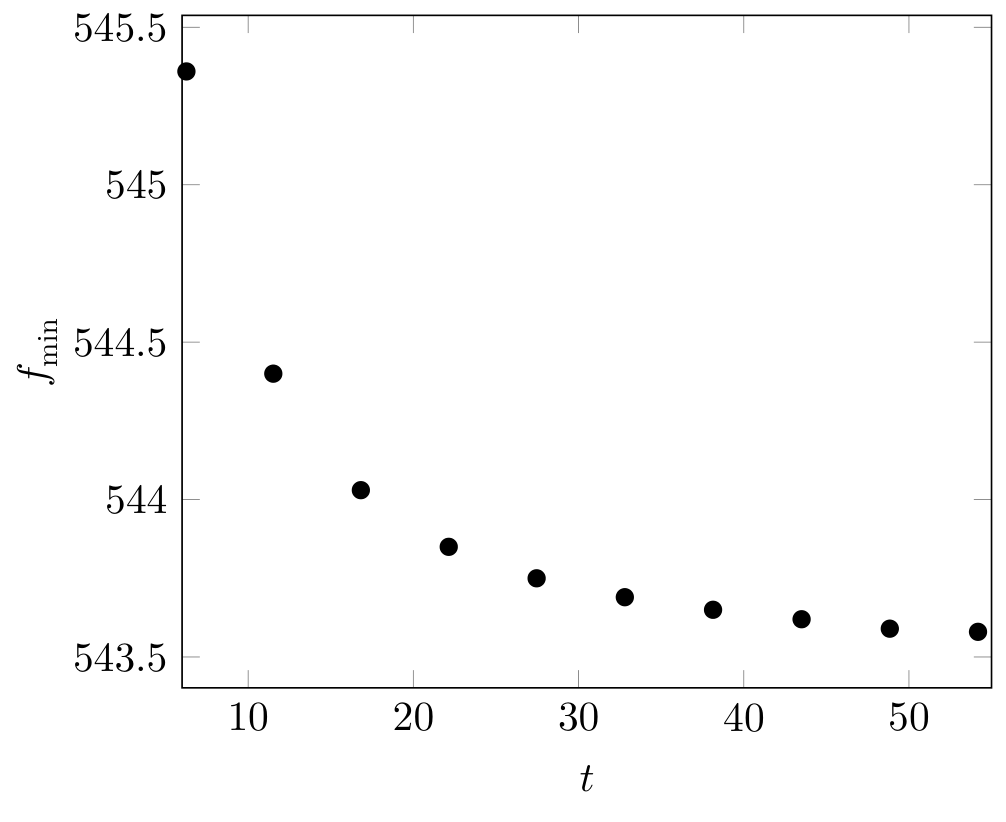
A.2 Keep the detector stationary at in the simulation. Observe the output graph of between the graph start and end time 5 s and 55 s respectively. Tabulate all the minima ( and the corresponding time ) in the range. Plot vs . [1,2 т.]
A.3 Obtain an expression for the minimum frequency that the detector will eventually detect if kept stationary. Express your answer in terms of , and the relevant variables. [1 т.]
You will be using various input values in the panel to obtain the answers for the following parts. In the table given on page A2-4, report the various values of , and Δ which you have used to obtain the quantity or any intermediate equation. Also, mention the corresponding quantity or that equation against the input values.
Any formulae/equations in solving this part must be mentioned in the working sheets in detail. Marks will not be awarded solely based on the final answer. If you want to use a graph, mention the graph paper number on the answer sheet. Note that there is no error estimation required in this question.
Solve the next four questions in any order that you find appropriate.
A.4 Obtain the source's initial coordinates i.e. coordinates of the point A at time in meters. [1,4 т.]
A.5 Obtain the values of . [2,1 т.]
A.6 Obtain the value of in degrees. [2 т.]
A.7 Obtain the source's initial center coordinates i.e. coordinates of the point C in meters. [2,1 т.]
Отговори
- A.1
- A.3
- A.4 xA = 419.99, yA = 499.99 (m)
- A.5 f0 = 990.26 Hz, ω = 1.49 s⁻¹, R = 120.57 m, vS = 91.1 m/s
- A.6 β = 28.36° (first method); β = 28.5° (alternate solution)
- A.7 (299.42, 499.99) m
Решение
EQ2: Acoustic black box solution¹
A.1
A.2
Figure below shows the graph obtained for the data point interval 0.02.
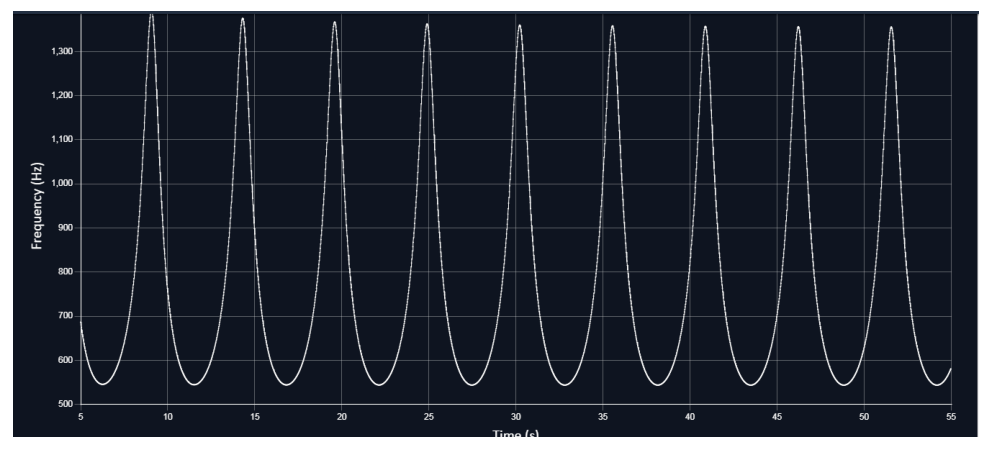
| Sr no | (s) | |
|---|---|---|
| 1 | 6.26 | 545.36 |
| 2 | 11.52 | 544.4 |
| 3 | 16.82 | 544.03 |
| 4 | 22.14 | 543.85 |
| 5 | 27.46 | 543.75 |
| 6 | 32.8 | 543.69 |
| 7 | 38.14 | 543.65 |
| 8 | 43.5 | 543.62 |
| 9 | 48.84 | 543.59 |
| 10 | 54.18 | 543.58 |
A.2 (cont.)
A.3
We take a general case in which both detector and the source are moving with velocities and respectively. Also, the line joining source and detector makes angle with the -axis as defined in fig. 1 of the question.
Note that is a function of time. Let be the vector joining the source and the detector. For the case when the source is approaching the detector, frequency detected by the detector is
Similarly, for the source moving away from the detector
The expression of minimum frequency in the asymptotic limit () is
A.4
Initial location of the source: Keep the detector first on the axis (say ,) and then on the axis (say ,) and from the graph, note down the time taken to reach the first signal to the detector. Lets denote these timings as and respectively. Then,
Solving above two equations will give the coordinates of the source. From the simulation, for m, s and s. Above equations have two solutions. We can keep the detector at third location to choose the correct pair. The answer is
A.5
Let the detector be at such a position where the source approaches the detector from a large distance (say from left side), crosses it and then moves away at a large distance (to the right side). In the asymptotic limits (far left and far right, ), two pairs of the frequencies will be detected by the detector. We take . On the far left side
On the far right side
Eqs. (11) and (12) yields
Eqs. (13) and (14) yields
It is also given that at , there is a finite distance between the source and the detector. This will cause a signal delay. Let be the time interval between two peaks (). In this case
Eqs. (15-17) can be solved together to obtain the values of and . It is necessary to keep the stationary detector at such coordinates (say ), so that the source approaches the detector from a large distance, crosses it and then moves away to a large distance. Note that the asymptotic behaviour can be identified in the region where the extrema in the graph remains almost constant. Also, we expect a sharp change in the graph if the detector's distance from the origin is such that the angle . Keeping the distance fixed at 8000 m, we try with various values of .
A.5 (cont.)
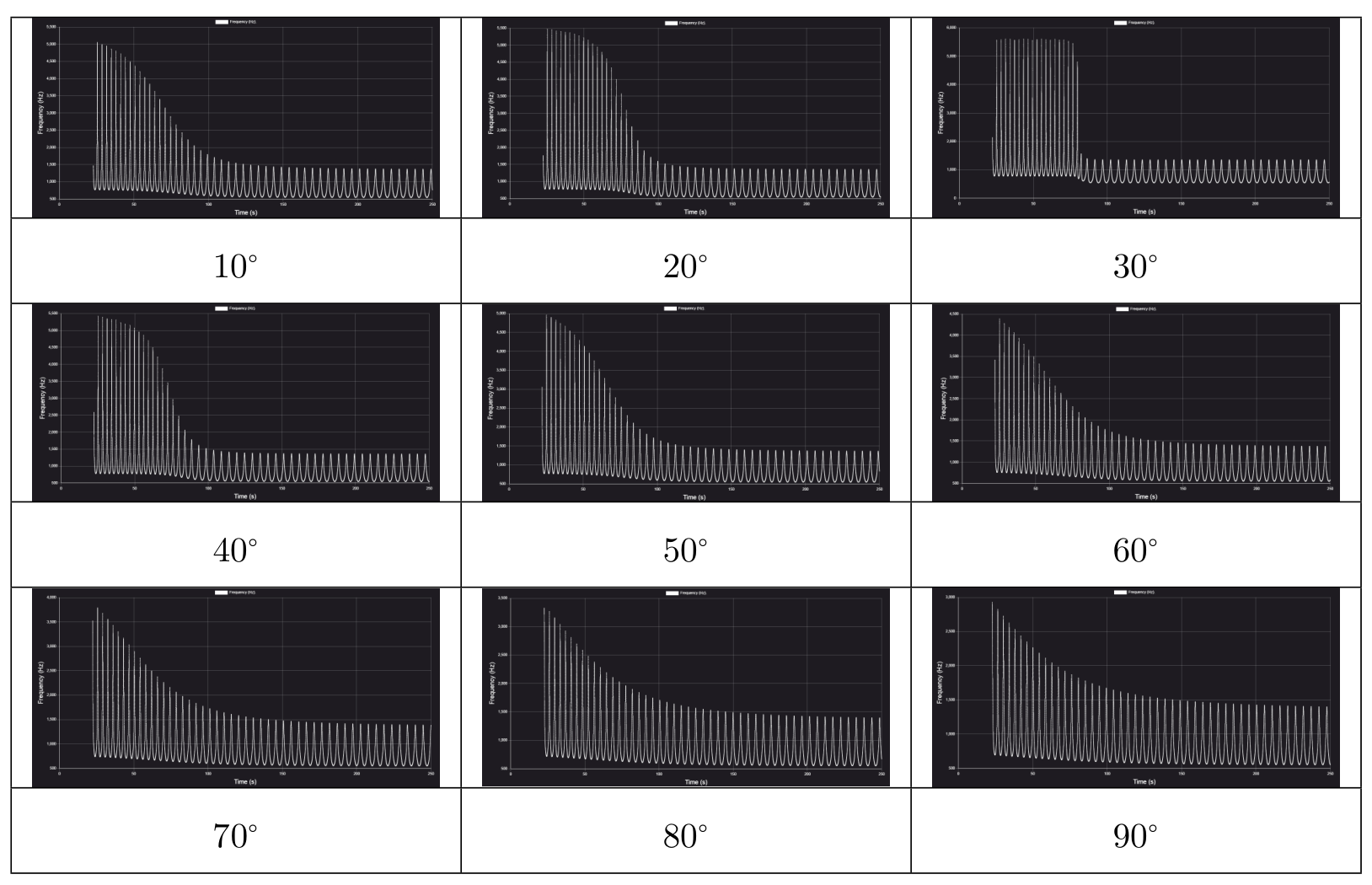
We can see that at , far left and right parts of the graph show asymptotic behaviour. In these regions, peak frequencies do not show appreciable change. Notice that the values of the peak frequencies in the left side of the graph is higher than the values of the peak frequencies in the right side of the graph in this region. This indicates that the source is moving away from the detector in the right side of the graph. Detector is placed somewhere in the transient region. Expand the graph for a far left region this gives with a decreased data point interval (say 0.001) for a more accurate and numbers.
Hz and Hz. Inserting this in Eq. (11)
Far right region gives
Hz and Hz. Inserting this in Eq. (12)
equations (18-19) yields m/s and m/s. Also,for any two peaks in asymptotic case
We use the value of m/s to get . From m/s, m. To obtain , insert Hz on the far right side in Eq. (8) and solve for . This gives to be 990.26 Hz.
A.5 (cont.)
| (Hz) | (s) | (m) | (m/s) |
|---|---|---|---|
| Hz | m | m/s |
A.6
Calculating
Figure below represents a schematic picture, where S is a source at a very large distance. P and Q represent two different positions of detectors placed at different instants.
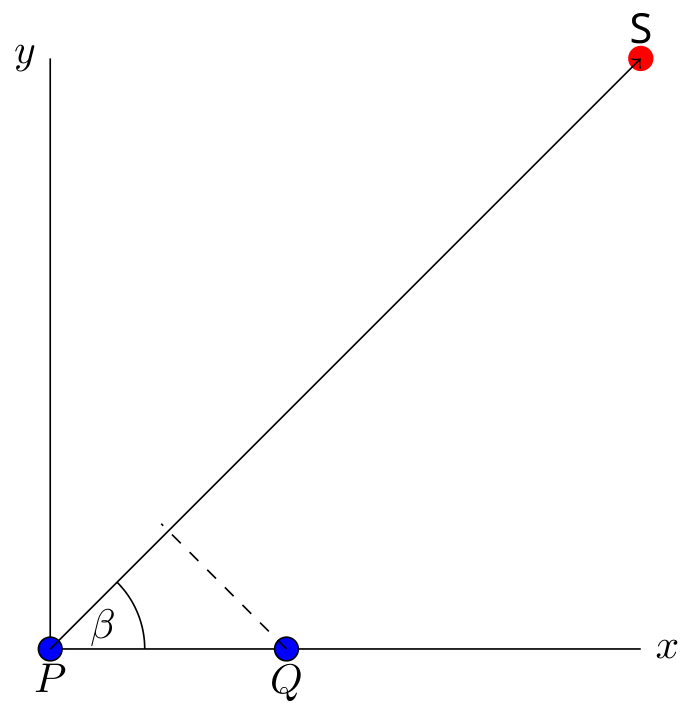
At large distances. let the time taken for the sound signal to reach at detector:
let the time taken for the sound signal to reach at detector:
The distance between detector and detector is 660m and corresponding time taken by sound to reach their respective detectors are 1009.61s and 1007.85s respectively. The expression for time difference is given by
which gives
A.6 (cont.)
Alternate solution for :
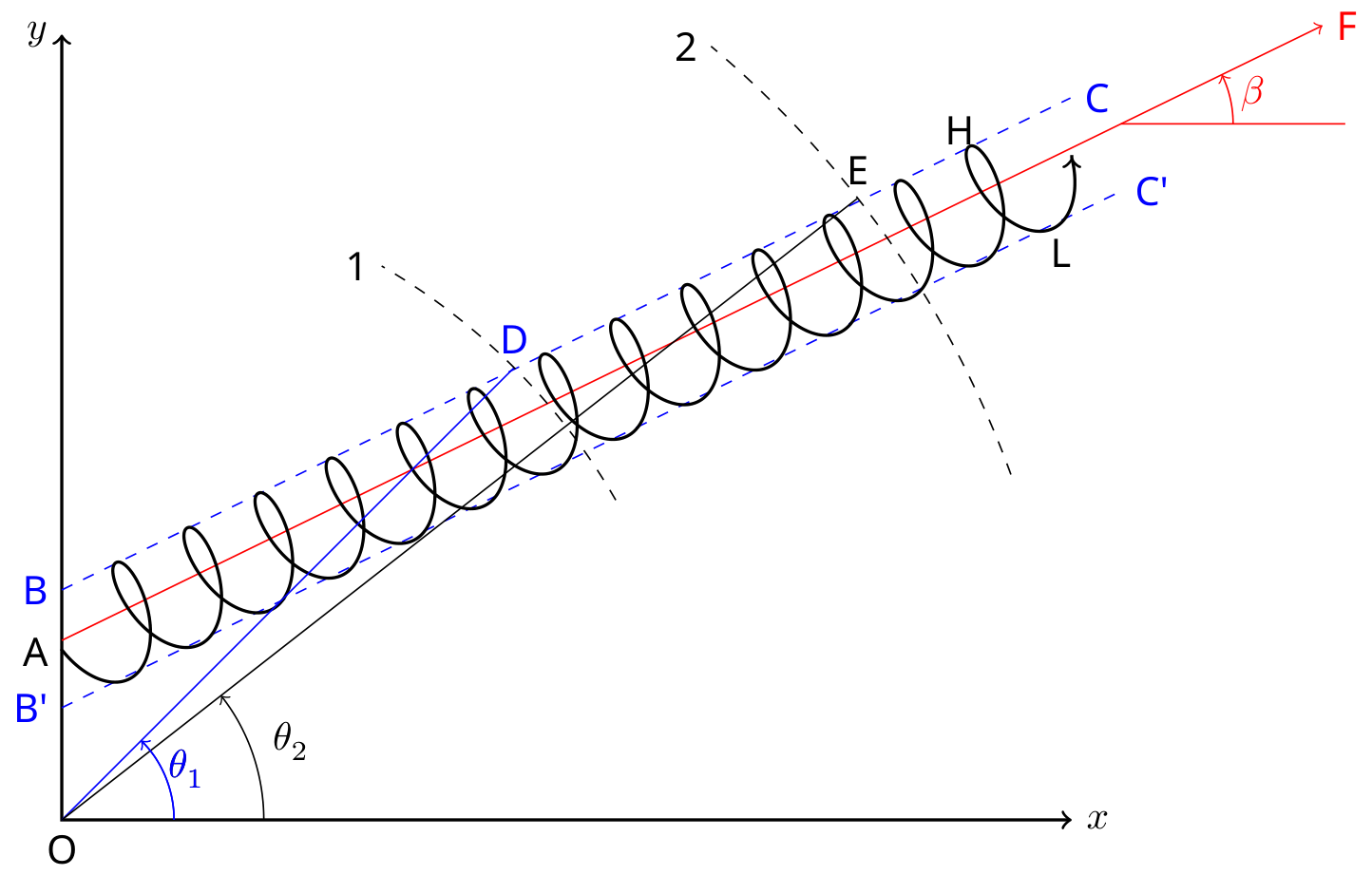
Red line AF depicts the direction of the velocity of the circle. We aim to determine which makes with the -axis.
Value of the frequency detected by the detector depends on two aspects, first from which location on the cycloid, the source emitted the signal and second, on the location of the detector.
Points H and L during one cycle of the source's trajectory depict the location where the source's speed is maximum and minimum respectively. This is due to being parallel or anti-parallel to the tangential velocity component of the rotation on these points.
As the source takes turn on the cycloid, detector on different angular positions on circular arc 1 will detect different values of corresponding to those positions. Starting from the angular position near the -axis (), will keep increasing till the detector is kept on point D at (). In fact, for any position on line BC which is parallel to AF, the detector will detect maximum of all . Similarly, if the detector is placed anywhere on line which is also parallel to AF, it will detect minimum of . In the simulation, you can change the angle by changing coordinates and keeping the velocities zero.
We repeat this exercise by changing the detector distance to arc 2. Scanning across the arc, angle can be obtained for which the detector detects maximum of .
Once we have the angular positions and determined, we can use the coordinates of point D and E to calculate the angle of segment DE which it makes with the -axis. This is the angle . If the coordinates of point D and E are and respectively. Then
A.6 (cont.)
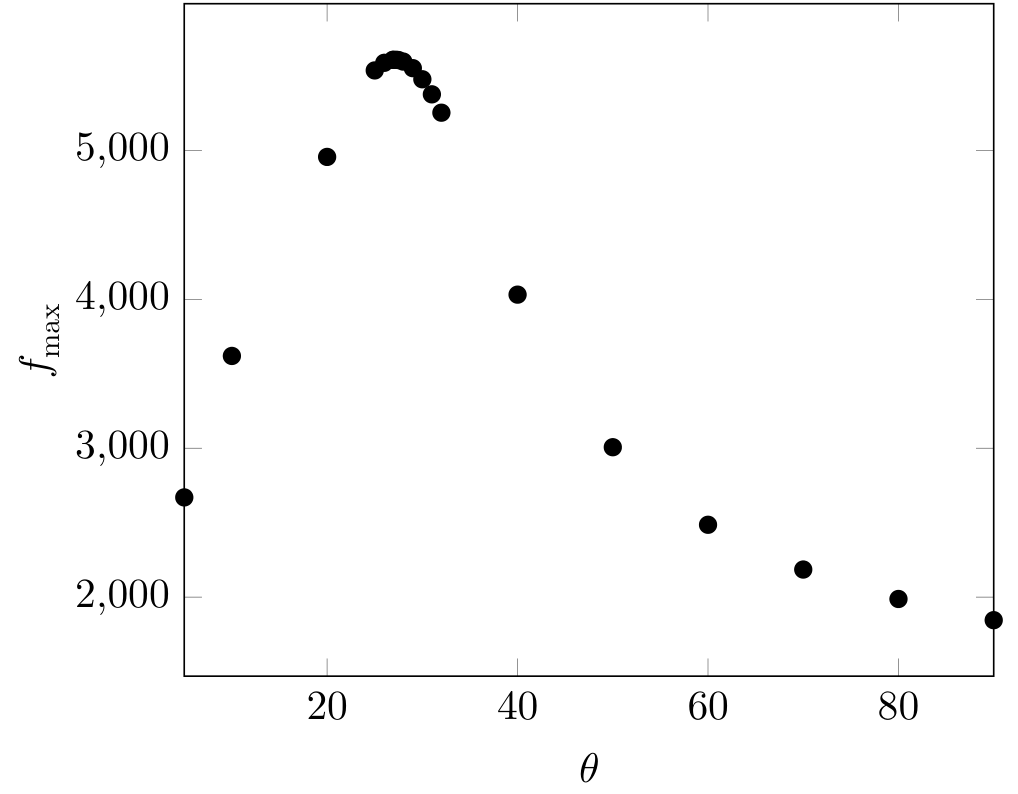
This process is illustrated in table below and the corresponding graph. First we place the detector at 8000 m away from the origin and change the coordinates for the corresponding angular position - . We record for any fixed cycle, (10th in this case). It can be seen from the plot of vs that the is between - .
| 5 | 676.08 | 2670.30 |
| 10 | 722.99 | 3620.51 |
| 20 | 763.49 | 4957.28 |
| 30 | 781.46 | 5478.86 |
| 40 | 753.98 | 4032.21 |
| 50 | 711.98 | 3007.44 |
| 60 | 677.39 | 2486.46 |
| 70 | 651.25 | 2185.81 |
| 80 | 630.99 | 1987.99 |
| 90 | 614.68 | 1845.65 |
A.6 (cont.)
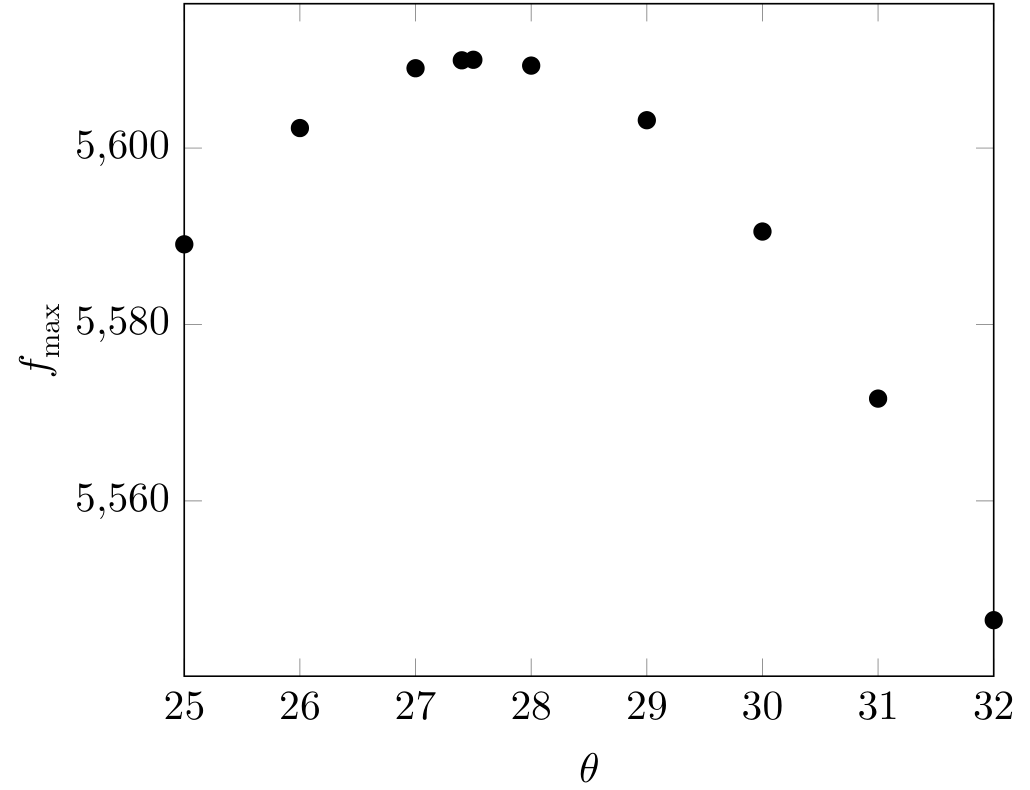
We go in smaller steps to determine more accurately. Figure below shows the table and graph for the variation between .
| 25 | 777.95 | 5538.23 |
| 26 | 779.67 | 5589.40 |
| 26.9 | 780.80 | 5609.15 |
| 27 | 780.90 | 5609.74 |
| 27.3 | 781.18 | 5609.546 |
| 27.5 | 781.33 | 5607.78 |
| 28 | 781.62 | 5597.66 |
| 29 | 781.81 | 5553.37 |
| 30 | 781.46 | 5478.86 |
| 31 | 780.58 | 5377.65 |
| 32 | 779.17 | 5254.35 |
It is clear from the table and graph that . We repeat this for another distance 16000 m. Table and graph for this distance is given below.
A.6 (cont.)
| 25 | 781.12 | 5589.093 |
| 26 | 781.47 | 5602.27 |
| 27 | 781.70 | 5609.05 |
| 27.4 | 781.76 | 5609.95 |
| 27.5 | 781.77 | 5610.01 |
| 28 | 781.81 | 5609.34 |
| 29 | 781.80 | 5603.16 |
| 30 | 781.66 | 5590.544 |
| 31 | 781.41 | 5571.60 |
| 32 | 781.04 | 5546.48 |
A.6 (cont.)
This gives . Taking the corresponding values of and using Eq. (23),
A.7
Coordinates of the center of the circle
For this part, keep the detector at some fixed position say on the -axis. A schematic diagram of the initial location of the source and the the detector is depicted in the figure below (figure is not to scale).
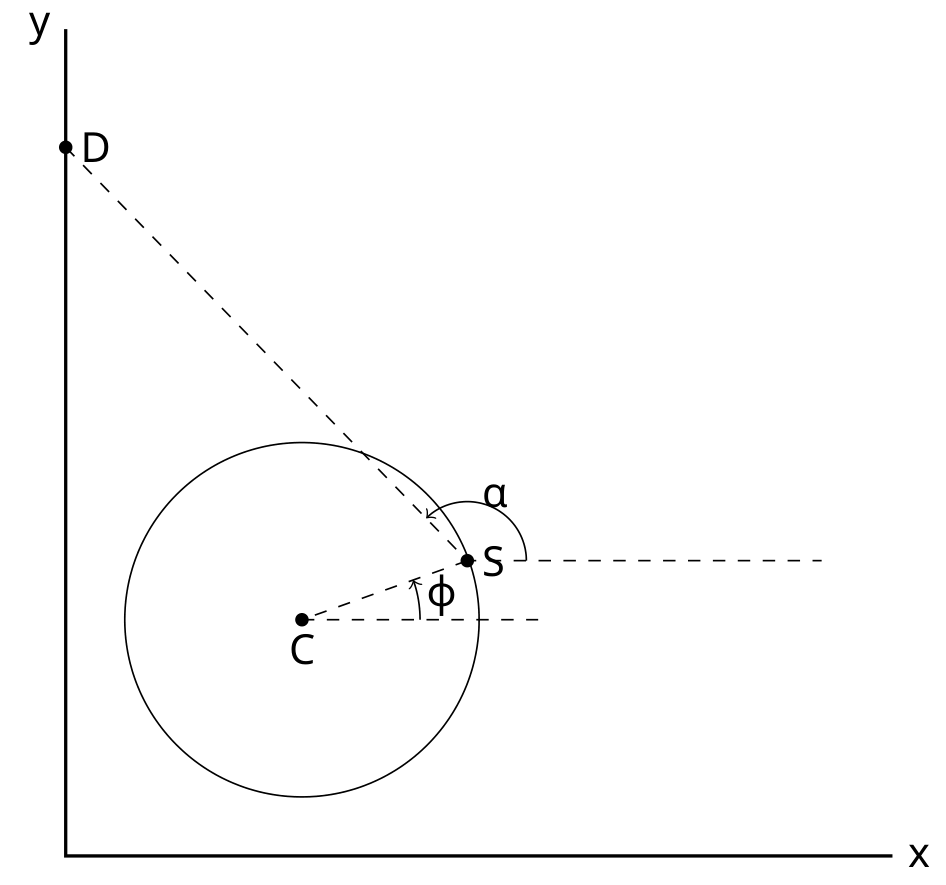
We record the detected frequency of the first signal sent by the source. We already have the value of and the source's initial coordinates. The detected frequency at , i.e. the first signal is 795.69 Hz if the detector is kept at 500 m on the -axis. With the source's coordinates (419.99,499.99) m,
Using the values of detected frequency and in Eq. (7)
This yields source's center coordinates to be (299.42,499.99) m.
¹ Siddharth Tiwary (IIT Powai, Mumbai), Siddhant Mukherjee (The University of Cambridge, UK), Chandan Relekar (IISc, Bangalore), Charudutt Kadolkar (IIT Guwahati), Praveen Pathak (HBCSE-TIFR, Mumbai), were the principal authors of this problem. The contributions of the Academic Committee and the International Board are gratefully acknowledged.
Оригинал в Архива: experiment-Q2-question.pdf · официални решения: experiment-Q2-solution.pdf